Search results for: “low vision”

  • How to Adapt Work for Blind or Low Vision Students — Many Options

    The most modern way as of 2024 to adapt work for blind or low vision students is using programs like MathKicker.ai, WORD Immersive Reader and Google Docs, follow these steps to ensure full accessibility for both English, Math and other content:

    1. Use MathKicker.ai for Math Content:
      • Upload or paste math equations into MathKicker.ai. This tool converts complex math problems into formats accessible for screen readers like JAWS or NVDA.
      • Once converted, paste the accessible math text into Google Docs or other word processing platforms for students to use with their screen readers.
    2. Convert Images to Descriptive Text in Google Docs:
      • When images contain important information, use Google Docs’ built-in alt text feature. Right-click the image, select “Alt text,” and enter a detailed description of the image, focusing on its relevance to the content.
      • For math-specific images (e.g., graphs, equations), describe the visual elements and provide the corresponding math in text form or, if needed, through MathKicker.ai to ensure clarity for students using auditory or Braille output.

    How to Adapt Work and Why

    3. Leverage Google Docs Collaboration Features:

    • Share Google Docs with students, allowing them to access the document using their preferred screen reader.
    • Enable real-time collaboration by ensuring that students can work in the document with peers or teachers, making the experience inclusive.

    4. Use Heading and Structure Tools:

    • Make sure to structure documents with proper headings and styles in Google Docs to aid screen readers in navigating the document efficiently.

    By combining MathKicker.ai for math accessibility and using Google Docs to convert visual content into descriptive text, blind or low vision students can access both English and math content effectively.

    There are many ways to adapt work for inclusion. Inaccessible work creates barriers—choose the right tools, because together we achieve more than apart.

     Here are a few ways to do just that.

    Adapting work using Jaws OCR-how to tell if work is image or text in PDF

    The fastest way to adapt inaccessible PDF with graphics when you run out of time

    How to adapt work for low vision–continue on with skills

    Adapt work for Low Vision using shapes for Math or Chemistry

    How to adapt work for blind/low vision students

    Access Technology for Low Vision-See your computer screen better

    Tricks for students to adapt last minute work fast –right in class
    How to adapt More work in general

    Let us know how we can help you!

  • How to SEE Your Computer Better with Low Vision

    How to SEE Your Computer Better with Low Vision

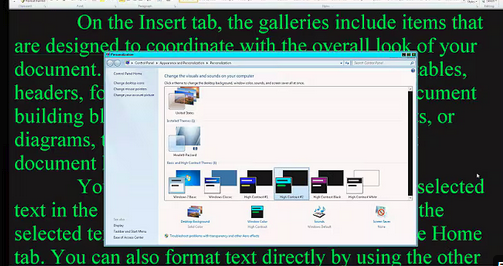
    The population of individuals with low vision exceeds that of those who are blind. It is expanding quickly as the population ages and experiences vision decline. A variety of lessons teach you how to download large cursors, enhance contrast, and enlarge text in Word. These skills also help you read with more ease. You’ll also learn how to magnify text and graphics on the Internet using different methods. Additionally, instructions on setting up low vision devices for students in classrooms who need to see the board are provided. These lessons are designed to improve your ability to see everything on your computer. The fact that these videos predate screen capture technology is irrelevant, as the skills are applicable to all versions of Windows.

    Skills to Enlarge Text as you need on any computer

     SEE your computer better, for users with low vision, using keyboard commands in Microsoft Word can significantly enhance visibility and ease of use. Here are some useful shortcuts:

    1. Zoom In/Out:
      • Zoom In: Press Alt + W, then Q, and use the Tab key to navigate to the zoom value you want.
      • Zoom Out: Use the same steps as above but adjust the zoom value accordingly.
    2. Adjust Font Size:
      • Increase Font Size: Press Ctrl + ].
      • Decrease Font Size: Press Ctrl + [.
    3. Magnifier:
      • Turn on Magnifier: Press Windows + + (Plus sign).
      • Zoom In: Press Windows + + (Plus sign).
      • Zoom Out: Press Windows + - (Minus sign).
      • Exit Magnifier: Press Windows + Esc.
    4. Change Font:
      • Open Font Dialog Box: Press Ctrl + D to open the Font dialog box where you can adjust font size, style, and other attributes.
    5. High Contrast Mode:
      • Toggle High Contrast Mode: Press Left Alt + Left Shift + Print Screen.

    Other Low Vision Skills to increase “Seeing” Ability

    This Video demonstrates other skills to decrease blue light and damage to your eyes while using your computer

    These shortcuts can help you SEE your computer better and make text more readable and improve overall accessibility in Word12.

    Add screen readers to get the audio feedback you need as vision decreases

    See the computer better with high contrast
    See your computer better with high contrast

    Other Vision impairment Information


  • Finding mouse cursor FAST-low Vision tricks

    If you have a vision challenge, here are great tricks to Finding mouse cursor FAST and easily.  

    This skill works on EVERY version of Windows.

    Find the mouse cursor using a large cursor
    Find the mouse cursor using a large cursor, using CTRL key and other tricks

    Another insightful lesson from TechVision in finding mouse cursor fast. In this video they demonstrate how to easily locate the mouse pointer when it’s too small or lost on the screen. These steps will enhance visibility and ensure the mouse is always within visual reach.

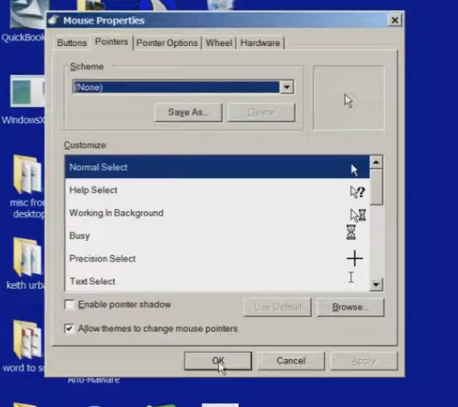
    To begin, press the Start key. On Windows 10 or later, simply start typing “mouse,” then select the result by pressing Enter to open the mouse settings. If settings opens first then tab to additional mouse settings.

    Once inside, use Ctrl + Tab to navigate to the properties section. From here, the user is presented with various pointer schemes. They can choose “Magnified” for an enlarged pointer, or opt for “Extra Large” or “Inverted,” depending on preference. For users with high contrast settings, an inverted large white pointer is particularly effective. In this instance, they recommend selecting the “Magnified System Scheme.”

    Now for the key trick: Ctrl + Tab to pointer options. At the bottom is an option labeled “Show location of pointer so the CTRL key is pressed you see it surrounded in circles. Or to enable this, use Alt + S or manually tab down to it. Once selected, press Alt + A to apply the changes, and then close the settings window.

    With this feature enabled, pressing the Ctrl key will cause a large white ring to appear around the mouse pointer, allowing users to quickly find it, even if it’s far off on the screen.

    This technique is particularly beneficial for individuals with low vision but can be useful for anyone who occasionally loses track of the mouse pointer. This simple yet effective tip ensures that the mouse pointer is always visible and easy to locate. Watch the full video for all those little tricks to make it easier to see your computer. In addition to seeing your computer better in general and other mouse access options.

    Find more low vision tricks here and this lesson will show you adjustments to your computer to slow down Blue Light Damage to your eyes while using your computer.

    Other Vision impairment Information


  • 2.2 Billion People Have Vision Loss: U.S. Statistics, Causes, and What It Means

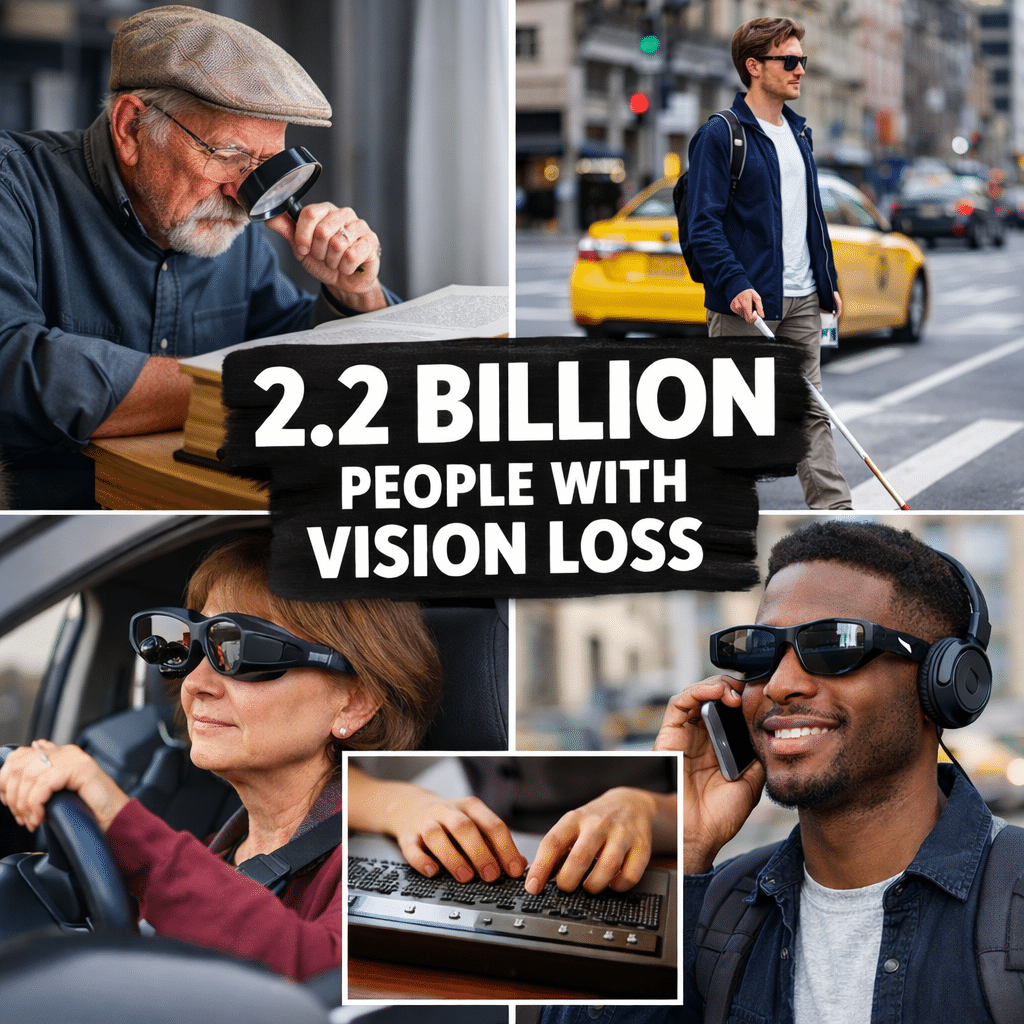
    2.2 billion people have vision loss
    2.2 billion people have vision loss

    2.2 Billion People Live With Vision Impairment

    Vision loss is one of the most common disabilities on earth, and it’s growing fast. If you work in healthcare, tech, education, or policy, these numbers matter for accessibility, product design, and funding.

    Over 51.9 million adults in the U.S. report some level of vision difficulty. About 6–7 million Americans have significant vision loss or blindness. Globally, 2.2 billion people have vision impairment.

    But those top-line numbers hide urgent trends. Here’s the breakdown with the latest 2024-2026 data, what’s driving it, and what to do about it.

    Key Statistics: U.S. Vision Loss at a Glance

    PopulationEstimateSourceWhat It Means
    U.S. adults with vision difficulty51.9+ millionCDC/NEI estimatesIncludes trouble seeing even with glasses, from mild to severe
    Significant vision loss or blindness6–7 million AmericansNEI/VEHSSLegal blindness 20/200 or worse, or 20/40 or worse with correction
    Adults 71+ with visual impairment>25%NHATS 2021 studyMore than 1 in 4 seniors
    Americans 40+ with eye problems90 millionCDC“More than 3 in 5” adults over 40
    Children under 18 with vision difficulty~625,000ACS 2023Includes blindness and “trouble seeing even with glasses”

    Global Vision Impairment: The 2.2 Billion Number Explained

    The World Health Organization estimates 2.2 billion people worldwide have near or distance vision impairment. Of those, at least 1 billion cases could have been prevented or have yet to be addressed with glasses, cataract surgery, or other treatment.

    Why it’s rising:

    1. Aging: By 2050, U.S. cases of visual impairment/blindness are expected to double to 8+ million as baby boomers age.
    2. Chronic disease: Diabetic retinopathy will increase 72% by 2050. Glaucoma and AMD will double.
    3. Uncorrected refractive error: 16.4 million Americans are expected to have difficulty seeing due to myopia/hyperopia that glasses could fix.

    What Counts as “Vision Impairment”?

    Researchers use different definitions, which is why numbers vary:

    1. Self-reported difficulty: ACS asks “Are you blind or do you have serious trouble seeing, even when wearing glasses?” 3.6M Americans 65+ said yes in 2023.
    2. Measured acuity: Legal blindness = 20/200 or worse. Visual impairment = 20/40 or worse with best correction.
    3. Functional vision: Trouble reading newsprint or doing near work even with glasses. About 1 in 8 Americans over 50 have presenting near-vision impairment.

    CDC notes: modeled estimates of “uncorrectable” vision loss differ from self-report, which includes people who lack glasses.

    What you can do to Help Yourself Now

    Why This Matters: Impact Beyond Eyesight

    Vision loss isn’t isolated. People with vision loss are more likely to have:

    • Type 2 diabetes, depression, stroke, hearing loss, chronic kidney disease
    • Isolation, falls, balance problems, risk of early death

    Economic cost: Vision problems will cost the U.S. $373 billion by 2050, a 157% increase.

    Public perception: In polls, losing eyesight ranks as a “10 out of 10” impact on quality of life for ~50% of Americans across racial/ethnic groups.

    1. Aging population: NHATS data shows >25% of adults 71+ have impairment. By 2029, all baby boomers will be 65+.
    2. Diabetes epidemic: Diabetic retinopathy cases rising 72% by 2050.
    3. Screen time & myopia: Uncorrected refractive error affects 8.2M Americans now and will hit 16.4M.
    4. Access gaps: Near-vision impairment is higher for many groups, lower income, and those without private insurance.

    What Can Be Done: Prevention & Accessibility in 2026

    1. Early detection works: “Early detection and intervention—possibly as simple as prescribing corrective lenses—could prevent a significant proportion of avoidable vision loss,” says NEI Director Dr. Paul Sieving.

    2. CDC’s Vision Health Initiative focuses on:

    • Assessing impact + at-risk populations
    • Evidence-based interventions
    • Increasing access to vision care

    3. For tech, web, and product teams:

    • 51.9M U.S. adults need larger text, high contrast, screen reader support, and voice navigation.
    • WCAG 2.2 AA is now baseline. Alt text, keyboard navigation, and captions aren’t “nice to have.”
    • AI tools like voice description and real-time image captioning are exploding because of this market.

    4. For employers & schools:

    • 1 in 8 people over 50 struggle with near vision. That means reading glasses policies, digital accessibility, and flexible print sizes are ADA issues.

    Takeaways for SEO & Content Creators

    If you’re writing about health, aging, tech, or accessibility, target these high-intent keywords:

    • “how many people are blind in the US”
    • “vision impairment statistics 2025”
    • “causes of vision loss over 40”
    • “ADA website requirements for vision”
    • “children with vision loss statistics”

    Bottom line: Vision impairment affects 2.2 billion people globally and 51.9M+ Americans. It’s not rare. With cases projected to double by 2050, design, policy, and healthcare decisions made today will determine whether that’s a crisis or a managed transition.

  • Speed Up a Slow Computer: Easy Fixes and Access Tech Tips

    Speed up a Slow Computer
    Speed up a Slow Computer

    Is your computer running slow, freezing, or taking forever to start up? Speed Up a Slow Computer with a few simple maintenance steps can make a huge difference. This is especially true for beginners and blind/low‑vision users who rely on consistent performance with JAWS or NVDA.

    In this TechVision tutorial, I walk you through practical, real‑life steps to speed up your PC and keep it running smoothly:

    ✔ Update your .NET Framework
    Having the latest .NET installed in your Control Panel helps programs run correctly. It also reduces system errors.

    ✔ Manage your startup programs
    Too many apps launching at boot can slow everything down. Turning off unnecessary startup items gives you a faster, cleaner start.

    Keep Windows and Office updated

    Regular updates improve performance, stability, and security — and prevent many common slow‑computer issues.

    ✔ Declutter your system
    Uninstall programs you don’t use and delete temporary files to free up space. This also reduces background load.

    ✔ Run a full antivirus scan
    Malware can dramatically slow down your system. A full scan helps identify and remove hidden threats.

    ✔ Perform regular maintenance
    Disk Cleanup, defrag (for HDDs), or optimize for SSD and clearing temp files all help your computer run more efficiently.

    These steps are simple, effective, and perfect for anyone building independence and confidence with their technology.

    TechVision: Empowering real‑life tech skills with clarity, accessibility, and confidence. Video with steps here

    Other computer fixes and skills

    Microsoft Edge Switching Accounts? Here’s the Fix

    LinkedIn with JAWS Commands for total Access

    Can’t Log In? Fix Password Problems Fast

    Fix and Speed Up Windows Computer in Minutes

    Best Computer Specs Guide: RAM, SSD, CPU and What .NET Really Does

    Restore System & Fix PC issues

    Speed up and Fix a SLOW Computer

    Easily Add “This PC” to Your Desktop for Fast Drive Access


  • What Does 20/70 Vision Look Like?

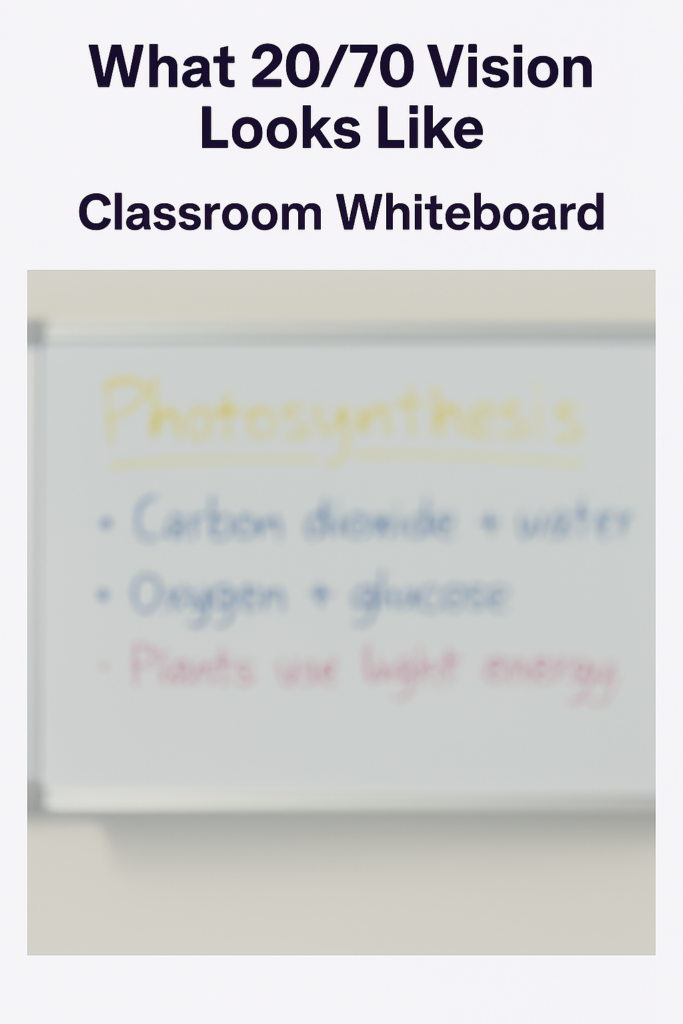
    what does 20/70 vision look like seeing a whiteboard 20 feet in the front of the classroom-very blurry and you can struggle to make out most words

    20/70 Vision Looking at whiteboard 20 feet ahead in a room

    Overview

    Many people wonder, What Does 20/70 Vision Look Like in everyday life? 20/70 vision means a person must stand 20 feet away to see what someone with typical 20/20 vision can see at 70 feet. It represents moderate low vision and often affects reading, recognizing faces, and seeing details at a distance — especially in classrooms, hallways, and outdoor environments.

    This page gives you:

    • A simple explanation
    • Real‑world examples
    • Functional impact
    • Classroom implications
    • Technology supports
    • A visual simulation (we’ll add images next)

    Simple Definition

    20/70 vision is a measurement of visual acuity, describing how clearly a person sees detail.

    • 20 = the testing distance
    • 70 = the distance at which a person with 20/20 vision sees the same detail

    So:

    If a student with 20/20 vision can read a sign at 70 feet,
    a student with 20/70 vision must move to 20 feet to see it.

    What 20/70 Vision Looks Like in Daily Life

    People with 20/70 vision often describe:

    • Blurry details at a distance
    • Difficulty reading small print
    • Needing to move closer to see faces clearly
    • Trouble with classroom boards or projectors
    • Missing fine details in worksheets or diagrams
    • Needing brighter lighting to see comfortably

    They can usually navigate independently but may struggle with:

    • Street signs
    • Bus numbers
    • Classroom whiteboards
    • Small text on screens
    • Low‑contrast materials

    Real‑World Examples

    (We’ll create images for each of these.)

    1. Classroom Whiteboard

    • Letters appear soft or fuzzy
    • Thin markers are difficult to see
    • Low‑contrast colors (yellow, light blue) nearly disappear

    2. Reading a Book or Worksheet

    • Small print blurs
    • Crowded text becomes tiring
    • Students may hold materials close

    3. Recognizing Faces Across a Room

    • Facial features blur
    • Expressions are harder to read
    • Social cues may be missed

    4. Street Signs or Hallway Signs

    • Letters blur at a distance
    • Students may walk closer to read room numbers

    Functional Impact in School

    Students with 20/70 vision may:

    • Miss information written on the board
    • Struggle with fast‑paced visual instruction
    • Fatigue quickly during reading
    • Need more time for visual tasks
    • Prefer sitting closer to the front
    • Benefit from bold, high‑contrast materials

    They often compensate well but may appear:

    • Distracted
    • Slow to copy notes
    • Unsure of directions
    • Hesitant in new environments

    These are vision‑based challenges, not cognitive ones.

    Supports That Help

    Students with 20/70 vision often benefit from:

    Classroom Supports

    • Preferential seating
    • High‑contrast markers
    • Bold print materials
    • Larger text (14–18 pt)
    • Clear, uncluttered worksheets

    Technology Supports

    • Zoom or magnification tools
    • High‑contrast mode
    • Larger font settings
    • Screen readers for longer text
    • Digital copies of board notes

    Environmental Supports

    • Good lighting
    • Reduced glare
    • Clear signage
    • High‑contrast labels

    Is 20/70 Vision Considered Legally Blind?

    No.

    Legal blindness is defined as:

    • 20/200 or worse in the better eye with correction,
      or
    • A visual field of 20 degrees or less.

    20/70 is moderate low vision, not legal blindness.

    Frequently Asked Questions

    Is 20/70 vision correctable?

    Sometimes. Glasses or contacts may improve clarity, but many students still function in the low‑vision range even with correction.

    Can a student with 20/70 vision read regular print?

    Yes — but they may need larger print, bold text, or better lighting to reduce fatigue.

    Does 20/70 vision affect mobility?

    Most students navigate independently, but may struggle with signs, steps, or low‑contrast obstacles.

    Is 20/70 vision stable?

    It depends on the underlying condition. Some remain stable; others may change over time.

    Understanding Vision in Children: What Visual Acuity Really Means

      Signs of Low Vision in Children Even when they Pass Screening

      What 20/40 Vision Means and Why “Almost Normal” Still Matters

      20/70 Vision Explained: What It Really Means and How It Affects Daily Life

      What does 20/100 vision look like?

      20/200 Vision Explained: What Everyone Gets Wrong About “Legal Blindness”

      What Does 20/400 Vision Look Like?

      What does 20/800 vision look like?

      When Vision Problems Look Like Misbehavior: What Parents and Teachers Miss

  • What Does 20/400 Vision Look Like?

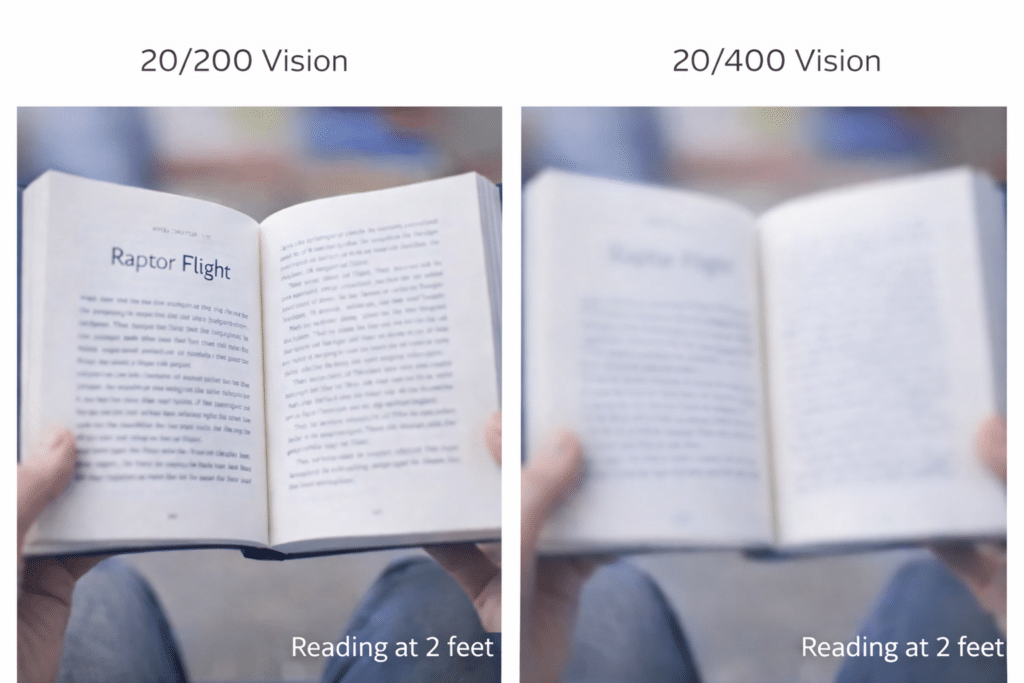
    What Does 20/400 Vision Look Like? Comparison of reading 20/200  and 20/400 -which is not doable-Time for Laptop and Screen reader
    What Does 20/400 Vision Look Like? Comparison of reading 20/200 and 20/400 -which is not doable-Time for Laptop and Screen reader

    Understanding Severe Vision Loss: (Legally Blind Explained)

    20/400 vision is not “very blurry.”
    It is functionally blind in most classroom situations.

    This acuity changes how a student sees the board, moves through hallways, and reads any printed material.

    Here is what 20/400 looks like in real life:


    1. The board disappears at distance

    At 20/400, the board becomes a hazy shape.
    Letters vanish instantly.
    Contrast does not help.

    Even bold markers fade into one blended patch of color.


    2. Faces become silhouettes

    Facial expressions blur into outlines.
    Students miss smiles, frowns, eyebrow lifts, and social cues that guide group interaction.

    This affects friendships and classroom communication.


    3. Reading moves inches from the face

    To see print, students move the page to within 3–5 inches with 28-42 enlarged font.
    This causes neck strain, fatigue, and slower reading.

    Large print may not help.

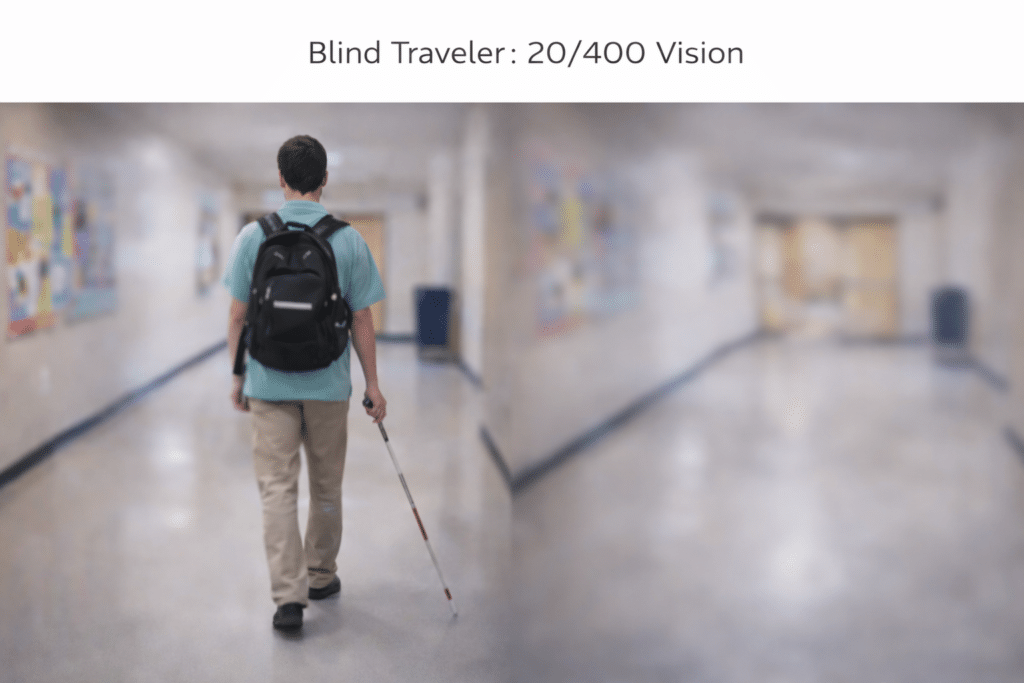
    What Does 20/400 Vision Look Like? Loss of clarity and blurry tones and outlines
    What Does 20/400 Vision Look Like? Loss of clarity and blurry tones and outlines

    4. Orientation and mobility require skill

    Hallways blur.
    Floor changes disappear.
    Open doors look like walls.

    Students with 20/400 need strong cane skills and consistent practice with routes.


    5. Fatigue arrives quickly

    The visual system works nonstop.
    This leads to exhaustion long before frustration shows up.

    Behavior that looks like “avoidance” is often fatigue.


    6. 20/400 can fluctuate toward 20/200

    Vision varies during the day.
    Fatigue, lighting, and glare make acuity worse.

    A student measuring 20/400 in the morning may function closer to 20/200 by afternoon or vice versa.

    On a Snellen chart, missing just one or two letters can shift a child from 20/200 to 20/400.

    This is why seating, lighting, contrast, and consistent access tools matter.


    20/400 is not a measure of intelligence

    It is a measure of access.

    With the right tools, students with 20/400 vision:

    • read using laptops and screen readers
    • work independently with braille, braille displays and tactile graphics
    • navigate confidently with cane and GPS
    • complete assignments alongside their peers using access technology

    If instruction begins early and stays consistent, they thrive.


    Understanding Vision in Children: What Visual Acuity Really Means

      Signs of Low Vision in Children Even when they Pass Screening

      What 20/40 Vision Means and Why “Almost Normal” Still Matters

      20/70 Vision Explained: What It Really Means and How It Affects Daily Life

      What does 20/100 vision look like?

      20/200 Vision Explained: What Everyone Gets Wrong About “Legal Blindness”

      What Does 20/400 Vision Look Like?

      What does 20/800 vision look like?

      When Vision Problems Look Like Misbehavior: What Parents and Teachers Miss

  • What does 20/800 vision look like?

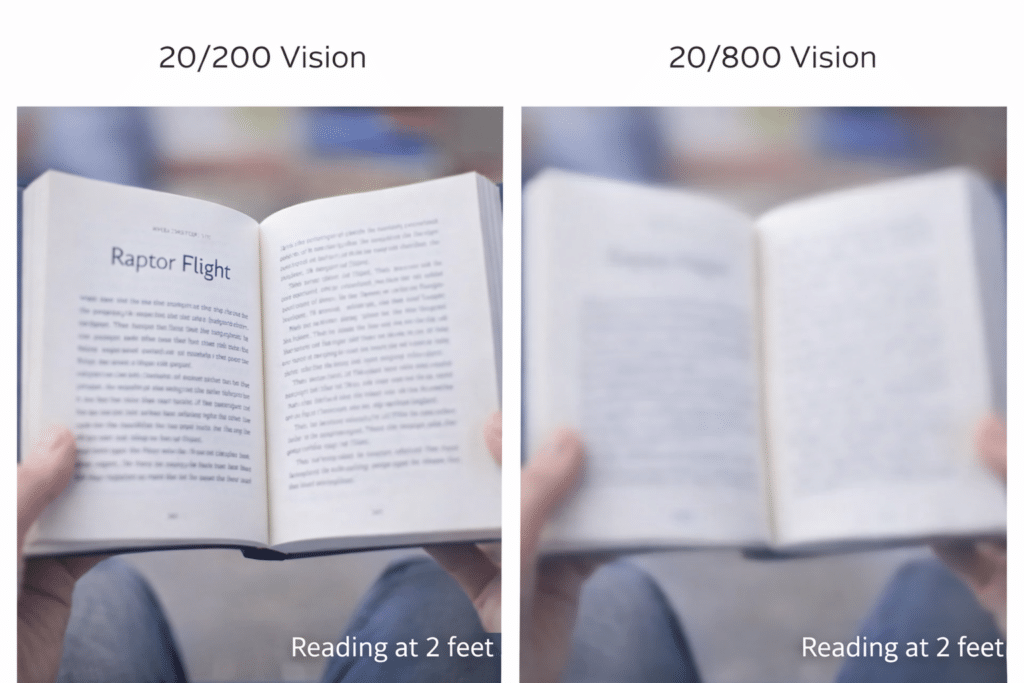
    What does 20/800 vision look like: 20/200 vision compared to 20/800
    What does 20/800 vision look like: 20/200 vision compared to 20/800

    20/800 is one of the most misunderstood acuity levels and is considered legally blind.
    People often assume it means “total blindness,” but that’s not accurate.
    20/800 is severe low vision, and while it dramatically reduces detail at distance, many students and adults still use this vision every day — just differently.

    Let’s break down what 20/800 really means in daily life.


    What Does 20/800 Vision Mean?

    A person with 20/800 vision sees at 20 feet what a person with typical vision sees at 800 feet.
    That’s a forty‑times loss of detail.

    This affects:

    • distance clarity
    • facial recognition
    • reading speed
    • contrast sensitivity
    • navigation
    • visual fatigue

    But it does not mean “no vision.”
    It means very limited detail, especially beyond arm’s length.


    How 20/800 Vision Shows Up in Real Life

    1. Distance detail is extremely limited

    At 20/800, the world beyond a few feet becomes shapes, outlines, and movement — not detail.
    Signs, faces, and board work are not readable at any distance.

    2. Faces are recognized by shape, hair, and movement

    Students often identify people by voice, posture, hairstyle, or clothing rather than facial features.

    3. Reading requires magnification or digital access

    Print must be significantly enlarged, or accessed digitally with zoom, contrast, and speech support.

    4. Contrast becomes essential

    Low‑contrast materials disappear.
    Bold, high‑contrast visuals make a dramatic difference.

    5. Mobility relies on pattern recognition, not detail

    Students may navigate familiar spaces independently but need support in unfamiliar or visually complex environments.


    How 20/800 Compares to Other Acuity Levels

    20/800 vs. 20/200

    20/200 is the legal definition of blindness.
    20/800 is four times further down the chart — but the functional difference is not linear.

    20/200 students may still catch some large details at distance.
    20/800 students rely almost entirely on near vision, contrast, and nonvisual cues.

    20/800 vs. 20/100

    20/100 students can often access large print and some distance information with effort.
    20/800 students cannot access distance information visually at all.

    20/800 vs. “no vision”

    It is not total blindness.
    Students may still detect:

    • light
    • motion
    • large shapes
    • high‑contrast objects
    • bold colors

    This remaining vision can be incredibly useful when paired with the right tools.


    What Students With 20/800 Need

    • digital access of all work with speech
    • predictable classroom layouts
    • tactile and auditory information
    • mobility support when needed
    • lighting that reduces glare
    • read using laptops with screen readers
    • work independently with braille, braille displays and tactile graphics
    • navigate confidently with cane and GPS
    • complete assignments alongside their peers using access technology
    • If instruction begins early and stays consistent, they thrive.

    These aren’t “extras.”
    They’re access tools that allow students to participate fully and confidently.


    The Bottom Line

    20/800 is severe low vision — but it is still usable vision.
    Students with 20/800 rely on a combination of visual, tactile, and auditory information, and with the right supports, they can read, learn, navigate, and thrive.

    Understanding what 20/800 really means helps educators stop assuming “total blindness” and start providing the access, dignity, and clarity every student deserves.

    Understanding Vision in Children: What Visual Acuity Really Means

      Signs of Low Vision in Children Even when they Pass Screening

      What 20/40 Vision Means and Why “Almost Normal” Still Matters

      20/70 Vision Explained: What It Really Means and How It Affects Daily Life

      What does 20/100 vision look like?

      20/200 Vision Explained: What Everyone Gets Wrong About “Legal Blindness”

      What Does 20/400 Vision Look Like?

      What does 20/800 vision look like?

      When Vision Problems Look Like Misbehavior: What Parents and Teachers Miss


  • What does 20/100 vision look like?

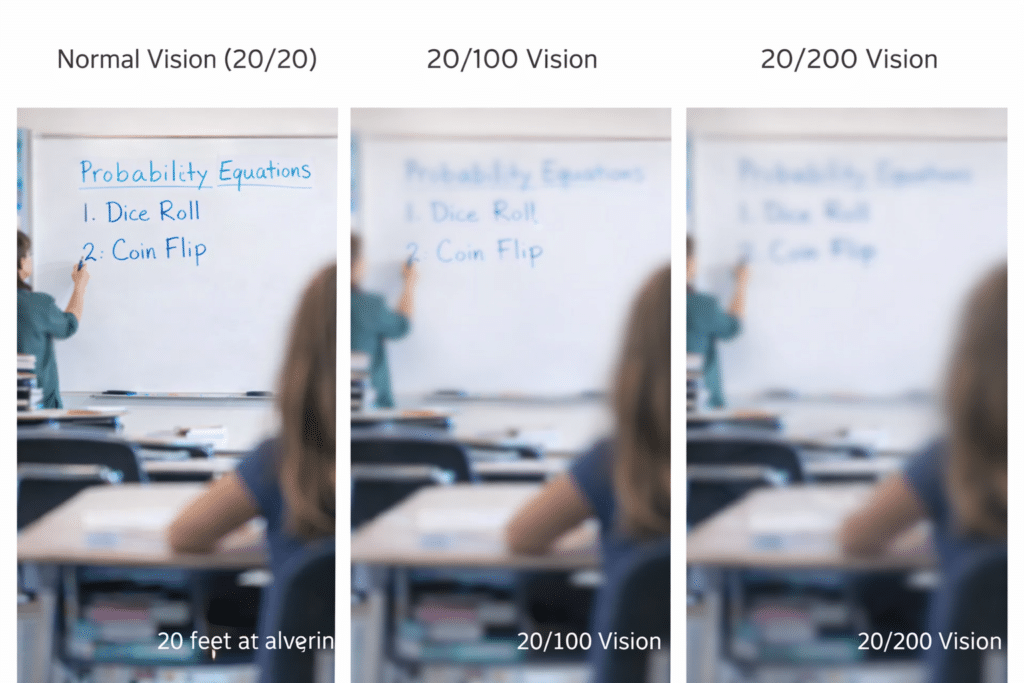
    What does 20/100 vision look like: 3 comparisons: 20/20, 20/100 and 20/200
    What does 20/100 vision look like: 3 comparisons: 20/20, 20/100 and 20/200

    20/100 Vision: What It Really Means for People (Not legally blind, but close)

    Many people hear “20/100” and think it is only “blurry.” But what does 20/100 vision look like for someone in everyday life?
    It is far more than that.
    For a student, 20/100 changes access to learning, classroom speed, and social interaction.

    1. The board exists, but details disappear

    A student with 20/100 sees the board, but letters fade quickly.
    Low contrast, faint markers, and glare make decoding slow.

    2. Text requires extra effort

    The eyes work harder to hold focus.
    Small print drains energy fast.
    Reading becomes a stamina task, not an intelligence test.

    3. Faces and expressions lose clarity

    At 20/100, subtle expressions vanish.
    Social cues move too fast.
    Misunderstandings follow because detail drops before meaning forms.

    4. Mobility becomes cautious

    Depth and detail shrink.
    Hallway movement requires more scanning.
    Crowded spaces increase stress and accidental bumps.

    5. Fatigue arrives early

    Eyes strain harder to stay clear.
    By mid-day, the visual system tires.
    Students feel the fatigue long before they report it.

    6. Behavior changes are often misread

    A student who looks away, slows down, or avoids reading is not lazy.
    They are adapting to a visual load others cannot see.


    20/100 Is Not “Almost Fine”—It Is Reduced Access

    This acuity does not reflect intelligence or motivation.
    It reflects how much effort a student must spend to access the same information as peers.

    With stronger contrast, better lighting, correct seating, and the right tools, students with 20/100 can thrive.


    How 20/100 Shifts Toward 20/200 During the Day

    Visual clarity changes with fatigue.
    By afternoon, students often experience:

    • slower refocusing
    • reduced contrast sensitivity
    • more blur at distance
    • difficulty maintaining near clarity

    This shift can push functional acuity close to 20/200, especially under stress, glare, or eye strain.

    It works much like a Snellen chart:
    A student who reads 20/100 in the morning may miss one or two extra letters later, shifting the score.
    Missing those letters can lower acuity enough to look more like 20/160–20/200, even though the eye disease did not change—only the fatigue did.


    Summary

    20/100 vision affects more than reading.
    It changes learning, speed, confidence, and daily stamina.
    Early support, correct tools, and intentional teaching help students keep pace and protect their energy.

    Keep in mind that life is competition so to keep up:

    Life is a measure of access.

    With the right tools, students with 20/100 vision:

    • can read using laptops and screen readers
    • People with 20/100 vision can work independently and may or may not need braille, braille displays, or tactile graphics, depending on whether their eye condition is stable or degenerative.
    • navigate confidently with cane and GPS
    • complete assignments alongside their peers using access technology

    If instruction begins early and stays consistent, they thrive.

    Understanding Vision in Children: What Visual Acuity Really Means

      Signs of Low Vision in Children Even when they Pass Screening

      What 20/40 Vision Means and Why “Almost Normal” Still Matters

      20/70 Vision Explained: What It Really Means and How It Affects Daily Life

    What Does 20/70 Vision Look Like?

      What does 20/100 vision look like?

      20/200 Vision Explained: What Everyone Gets Wrong About “Legal Blindness”

      What Does 20/400 Vision Look Like?

      What does 20/800 vision look like?

      When Vision Problems Look Like Misbehavior: What Parents and Teachers Miss

  • What 20/40 Vision Means and Why “Almost Normal” Still Matters

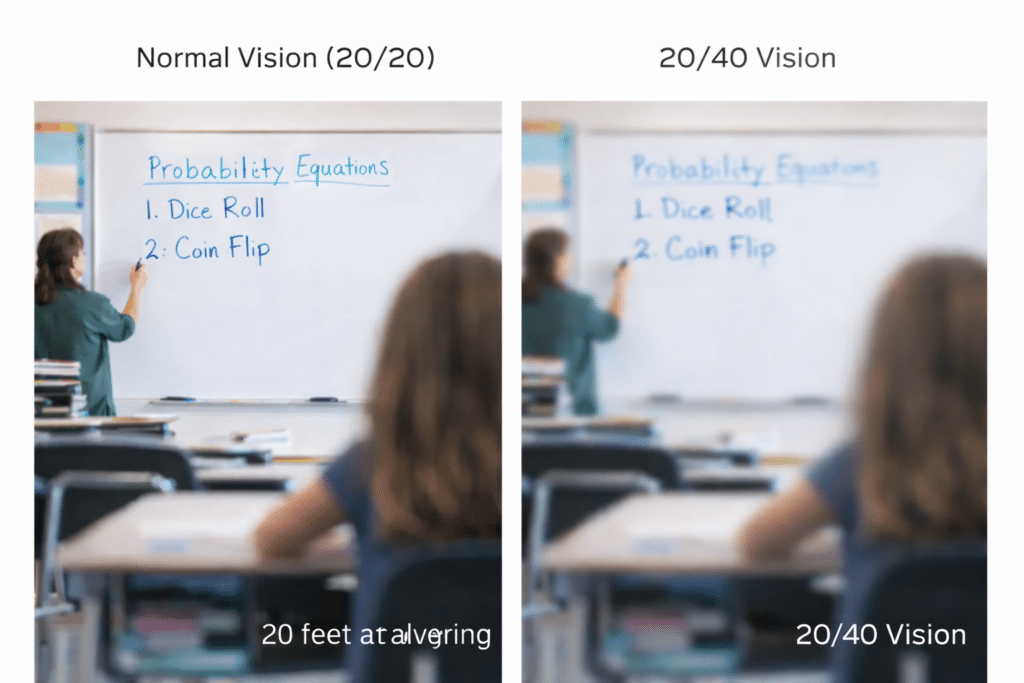
    What 20/40 vision means at 20 feet trying to look at board
    What 20/40 vision means at 20 feet trying to look at board

    Understanding 20/40 Vision: Why “Almost Normal” Still Matters in the Classroom

    When people hear 20/40 vision, they often assume it means “just a little blurry.”
    But for many students, 20/40 affects how they access learning, social cues, and the fast‑moving visual world of school. It’s not a measure of intelligence or effort — it’s a measure of visual access.

    Here’s what 20/40 really means, and why it deserves attention.


    What Does 20/40 Vision Mean?

    A student with 20/40 vision sees at 20 feet what a student with typical vision sees at 40 feet.
    That difference may sound small, but in real‑world environments — classrooms, hallways, playgrounds, screens — it adds up quickly.

    20/40 is still within the “legal driving” range in many places, but that doesn’t mean it’s effortless.
    It simply means the student can function — not that they can function comfortably.


    How 20/40 Vision Shows Up in Daily School Life

    1. The board is readable… until conditions change

    Students may read the board when the lighting is perfect and the marker is bold.
    But add glare, faint ink, low contrast slides, or distance, and clarity drops fast.

    This leads to guessing, leaning forward, or quietly copying from a friend.

    2. Small print requires more effort

    Worksheets with tiny fonts, cluttered layouts, or dense text slow students down.
    They can read it — but it takes more energy, and fatigue shows up long before frustration.

    3. Social cues can be harder to interpret

    Facial expressions, quick gestures, and subtle movements may be harder to see from across the room.
    This can lead to misunderstandings that look like inattention or missed cues.

    4. Outdoor environments are visually demanding

    Playgrounds, fields, and parking lots introduce glare, shadows, and low‑contrast backgrounds.
    Spotting details — a ball, a friend waving, a step — takes more effort.

    5. Students may not report difficulty

    Kids with 20/40 often assume everyone sees this way.
    They adapt quietly, work harder than adults realize, and rarely complain.


    Why 20/40 Still Matters for Access

    20/40 doesn’t require the same level of support as 20/200 or 20/70, but it still impacts:

    • reading speed
    • visual endurance
    • accuracy at distance
    • social interpretation
    • comfort in bright or low‑contrast environments

    Small changes can make a big difference:

    • better contrast on the board
    • bold markers
    • seating that reduces glare
    • slightly larger print
    • uncluttered worksheets
    • digital access when possible

    These aren’t “accommodations.”
    They’re access strategies — the same ones sighted students benefit from, just more essential here.


    The Bottom Line

    20/40 is not “almost normal.”
    It’s a visual profile that requires awareness, thoughtful design, and small adjustments that protect a student’s energy and confidence.

    When we understand what 20/40 really means, we stop assuming students are “fine” — and start giving them the clarity they deserve and access to their world.


    Understanding Vision in Children: What Visual Acuity Really Means

      Signs of Low Vision in Children Even when they Pass Screening

    Low Vision to Legally Blind

    What 20/40 Vision Means and Why “Almost Normal” Still Matters

    Low Vision Students Face Depression and Despair When Forced to Learn Visually

    2.2 Billion People Have Vision Loss: U.S. Statistics, Causes, and What It Means

    How to Read, Write, and Learn with Low Vision (Tools + Techniques)

    What Does 20/70 Vision Look Like?

    What Does Legally Blind Look Like?

    Signs of Low Vision in Children Even when they Pass Screening

    What Does 20/400 Vision Look Like?

    How about what 20/800 vision look like?

    What does 20/100 vision look like?