
2.2 Billion People Live With Vision Impairment
Vision loss is one of the most common disabilities on earth, and it’s growing fast. If you work in healthcare, tech, education, or policy, these numbers matter for accessibility, product design, and funding.
Over 51.9 million adults in the U.S. report some level of vision difficulty. About 6–7 million Americans have significant vision loss or blindness. Globally, 2.2 billion people have vision impairment.
But those top-line numbers hide urgent trends. Here’s the breakdown with the latest 2024-2026 data, what’s driving it, and what to do about it.
Tools + Techniques That Build Real Independence
Students and adults with vision challenges do not learn one way.
They require the right tools, combined with direct, targeted training.
Success happens when tools match the vision need and instruction builds efficiency
Tools + Training by Vision Need
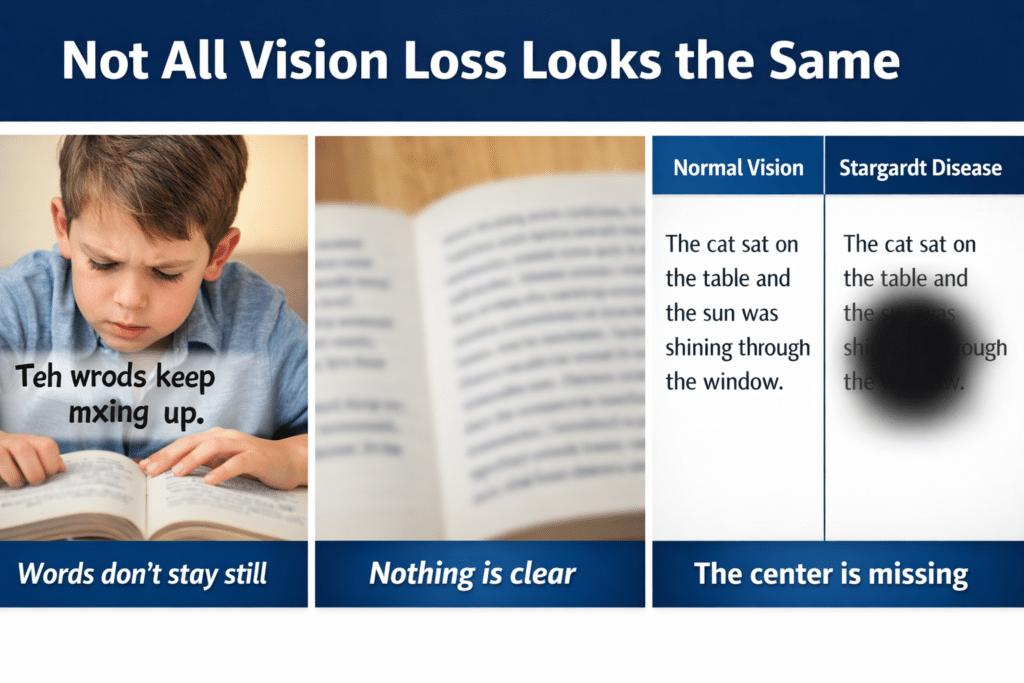
1. Dyslexia (Processing and Decoding)
Dyslexia affects how the brain processes text. It often overlaps with vision-related challenges.
Tools
- Text-to-speech: JAWS, NVDA
- Speech-to-text (dictation)
- Immersive Reader
- Audiobooks: Bookshare, Learning Ally
Training Focus
- Pair listening with reading
- Build strong keyboarding for writing
- Navigate digital text efficiently
Goal
Improve comprehension while reducing reading fatigue
2. Blurred or Reduced Vision (Low Vision)
Tools
- Magnification: ZoomText, Windows Magnifier
- High contrast and color filters
- Enlarged text and screen scaling
- Screen readers: JAWS, NVDA
Training Focus
- Use magnification efficiently without losing place
- Strengthen visual tracking
- Transition smoothly to audio when needed
- Master keyboard navigation
Goal
Maximize usable vision while increasing speed and accuracy
3. Central Vision Loss
(Stargardt, macular degeneration)
Tools
- Screen reader (primary): JAWS, NVDA
- Refreshable braille display
- Audio + braille combination
- OCR tools for printed content
Training Focus
- Full keyboard control
- Braille literacy (UEB and Nemeth)
- Strong auditory processing
Goal
Achieve full independence through non-visual access
4. General Eye Conditio
(Astigmatism, myopia, hyperopia, cataracts, glaucoma, diabetic retinopathy)
Tools
- Glasses or contacts
- Lighting adjustments (often overlooked but critical)
- Contrast and display adjustments
- Screen scaling and font control
- Optional magnification
- Screen reader support when fatigue increases
Training Focus
- Keyboarding and screen reader commands
- Proper screen positioning and posture
- Lighting control to reduce glare
- Efficient reading strategies
- Knowing when to switch to audio
Goal
Reduce fatigue and maintain consistent access throughout the day
Cross-Over Tools for ALL Learners
- Microsoft Word for accessible writing and math
- Screen reader + keyboard command mastery
- Accessible PDFs and web navigation
- AI tools for transcription, especially math and images
- Speech dictation to tell your computer and phone what to do
Critical Insight
Most individuals do not fit into one category.
They often experience a combination of needs:
- Low vision with fatigue
- Dyslexia with vision challenges
- Progressive vision changes over time
This reality requires flexible and layered instruction.
Everyday Access Tools
Screen Readers (Text-to-Speech)
- JAWS (Windows, advanced, workplace standard)
- NVDA (Windows, free)
- VoiceOver (built into Apple devices)
- TalkBack
- Narrator
Magnification and Visual Support
- ZoomText
- Built-in magnifiers (Windows and macOS)
- Seeing AI
- Be My Eyes
- Aira
- Computers have built in enlargement options
Braille and Tactile Tools
- Refreshable braille displays (Focus, Brailliant)-go electronic for speed and efficiency
- Perkins Brailler when young
Navigation and Daily Living-too many to name
- OrCam MyEye
- WeWALK Smart Cane
- BlindSquare
Critical Truth
Tools alone do not create independence.
Training builds independence.
Instruction must:
- Connect directly to real school, work, or life tasks
- Build speed and efficiency
- Focus on completing meaningful work
Bottom Line
- Dyslexia → audio with structured reading
- Low vision → magnification with efficiency
- Central vision loss → audio and braille access
- General eye conditions → reduce strain and optimize access
With the right tools and strong training, students and adults can access, complete, and submit work alongside their peers.