Search results for: “young”

  • What Does Legally Blind Look Like?

    Many people wonder what does legally blind look like? In fact, visual acuity below 20/200 qualifies as legally blind. To actually fit the definition, the person must not be able to attain 20/200 vision even with prescription eye wear. People with legal blindness can function effectively in daily life using appropriate glasses or contact lenses.

    Educational Definition for Services

    Under the new criteria, if a person’s visual acuity is measured with one of the newer charts, and they cannot read any of the letters on the 20/100 line, they will qualify as legally blind, based on a visual acuity of 20/200 or less. Based on acuity Work will need to be adapted.

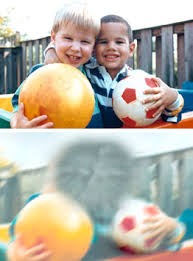
    These images as examples used in presentations.

    20/20 and 20/40
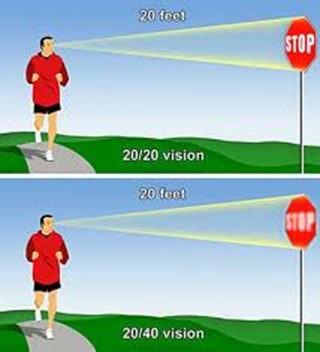
    20/20 vision
    20/40 vision-sight blur

    Low Vision Options can adjust how ones sees the computer or even access the use of a mouse.

    20/70 is not legally blind

    20/70 visual acuity--very blurry
    20/70 visual acuity–very blurry

    This vision means that a person sees at 20 feet what someone with normal vision sees at 70 feet. It is a form of visual impairment classified as mild low vision. Here’s a breakdown of what this means and its implications: Based on diagnosis, this acuity can get worse throughout the day.

    1. Definition of 20/70 Vision

    • In a standard eye exam, the results are written as a fraction, with 20/20 being considered normal vision.
    • The first number (20) refers to the distance (in feet) from which a person views an object.
    • The second number (70) indicates the distance at which a person with normal vision can see the same object with clarity.
    • Thus, someone with 20/70 vision must be closer to an object (20 feet away) to see it as clearly as a person with 20/20 vision can from 70 feet.

    2. Implications of 20/70 Vision

    • Legally Not Blind: This level of vision does not qualify as legal blindness, which is defined as 20/200 or worse with corrective lenses.
    • Difficulty with Certain Tasks: Individuals with 20/70 vision may struggle with tasks requiring clear distance vision, such as reading road signs, recognizing faces from a distance, or seeing objects clearly in low-light conditions.
    • Daily Life Adjustments: Depending on the person’s environment, they may need glasses or contact lenses to enhance their vision for specific tasks. However, vision aids may not fully restore perfect clarity.

    3. Corrective Measures

    • Eyeglasses or Contact Lenses: Many individuals with 20/70 vision wear corrective lenses to improve visual acuity.
    • Low Vision Aids: Some people might benefit from magnifying devices, large-print materials, or enhanced lighting to assist with reading or other close-up tasks.
    • Adaptive Technology: Screen magnifiers, larger fonts on digital devices, and software that enhances visual contrast can also help improve accessibility for people with 20/70 vision.

    4. Potential Causes

    • Refractive Errors: Conditions like myopia (nearsightedness), hyperopia (farsightedness), or astigmatism can result in 20/70 vision if not corrected.
    • Eye Diseases: Conditions like cataracts, macular degeneration, glaucoma, or diabetic retinopathy may cause a person’s vision to deteriorate to 20/70.
    • Age-Related Changes: Vision often declines naturally with age, and some individuals may experience 20/70 vision due to presbyopia or other age-related conditions.

    5. Treatment and Management

    • Regular eye exams are essential to monitor vision changes.
    • Wearing prescribed corrective lenses and using adaptive aids can help individuals maintain independence and improve their quality of life.
    • Early detection of underlying conditions (e.g., glaucoma or cataracts) through eye exams can prevent further vision loss.

    In summary, 20/70 vision reflects a moderate visual impairment. While it can pose challenges for certain activities, corrective measures and assistive technologies can significantly enhance visual functioning and quality of life.

    legally blind looks like-all acuity levels compared-
    all acuity levels compared

    20/100 vision means that a person sees at 20 feet what someone with normal vision can see clearly at 100 feet. This level of visual acuity is considered moderate low vision. Here’s a detailed explanation of what 20/100 vision means and its implications:

    1. Definition of 20/100 Vision

    • Visual Acuity Measurement: Vision is typically measured using a Snellen eye chart, and the result is expressed as a fraction. The first number (20) represents the distance at which the person is standing from the chart. The second number (100) indicates the distance at which a person with normal vision (20/20) can see the same object clearly.
    • Therefore, a person with 20/100 vision must be much closer to an object (20 feet away) to see it clearly, while someone with normal vision can see it clearly from 100 feet away.

    2. Implications of 20/100 Vision

    • People with 20/100 vision are considered legally visually impaired. However, this does not meet the definition of legal blindness, which is 20/200 or worse. Even with corrective lenses, they fall under the low vision category. This means normal vision remains unattainable.
    • When it comes to daily tasks, they often struggle with seeing distant objects clearly. For instance, they may have trouble reading signs from far away. Recognizing faces across a room or on the street is also challenging. Watching TV or presentations requires sitting close. Driving presents challenges, as they may not clearly see signs or signals from a safe distance.
    • Close-up tasks can be easier for those with 20/100 vision. Reading or using a computer may not be as difficult. However, many still require magnification or adaptive tools to assist with these activities.

    3. Impact on Daily Life

    Technology has changed everything toward independence, including AI apps that will read to you what you cannot see.

    • Driving: In many regions, individuals with 20/100 vision may not meet the vision requirements for driving. Driving may be possible with special accommodations or vision aids, but restrictions usually apply.
    • Work and Education: Individuals with 20/100 vision may need accommodations in the workplace or classroom, such as enlarged print materials, magnifiers, or assistive software. Special seating or devices may also be necessary to ensure they can participate fully.
    • Mobility: While 20/100 vision allows for some independent movement, it can still make navigating unfamiliar environments more challenging. Some individuals may benefit from mobility aids like a cane or guide dog in certain situations. Based on diagnosis, 20/100 can change to 20/200 or worse during any day at school or work based on eye fatigue.

    Different levels of Vision Loss to easily compare:

    20/20 visual acuity to see people clearly in distance
    20/20 visual acuity to see people clearly in distance
    20/200 seeing blurry people in the distance
    20/200 seeing blurry people in the distance
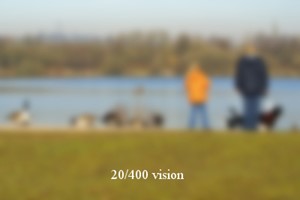
    20/400 acuity seeing people extremely blurry in distance
    20/400 acuity seeing people extremely blurry in distance

    What legally blind looks like and is:

    20/200 vision is a severe level of visual impairment and is often classified as legal blindness in many regions. It means that a person with this level of vision can see at 20 feet what a person with normal vision can see clearly at 200 feet. Here’s an overview of 20/200 vision and its implications: Technology has changed everything toward independence, including AI apps that will transcribe the inaccessible to accessible for you what you cannot see

    1. Definition of 20/200 Vision

    • In an eye exam, vision is expressed as a fraction. The first number (20) refers to the distance (in feet) from which the person views an object. The second number (200) indicates the distance at which a person with normal vision can see the same object clearly.
    • Therefore, someone with 20/200 vision must be much closer to an object (20 feet away) to see it with clarity, while a person with normal vision can see it clearly from 200 feet away.

    2. Legal Blindness

    • Legally Blind: A person with 20/200 vision is considered legally blind. Legal blindness is defined as having a visual acuity of 20/200 or worse in the better eye with the best possible corrective lenses.
    • Low Vision Category: While legally blind, individuals with 20/200 vision may still have some functional sight. They fall under the category of low vision, meaning that although their vision is severely impaired, they can still benefit from visual aids.

    3. Impact on Daily Life

    • Challenges with Distance Vision: Individuals with 20/200 vision have significant difficulty seeing objects, signs, or faces at a distance. Recognizing faces across a room, reading road signs while driving, or watching TV from a typical distance can be very challenging or impossible.
    • Mobility and Orientation: Moving through unfamiliar environments may require assistance or adaptations. People with 20/200 vision often need to use mobility aids, such as a white cane or guide dog, to navigate safely.
    • Reading and Close-Up Work: Although close-up vision may be better, people with 20/200 vision often require magnifiers or other visual aids for reading or detailed work.

    4. Corrective Measures

    • Eyeglasses or Contact Lenses: In some cases, corrective lenses may slightly improve vision. However, they often cannot bring a person’s vision to normal (20/20) levels when the vision loss is significant.
    • Low Vision Aids: Various devices can assist people with 20/200 vision in their daily lives, including:
      • Magnifiers: Handheld or electronic magnifiers for reading and detailed work.
      • Screen Readers: Digital devices or computers with screen readers that convert text to speech.
      • CCTV Systems: Closed-circuit television systems that enlarge printed text or images onto a screen.
      • Large-Print Materials: Books and materials with large text can make reading easier.

    5. Driving Restrictions

    • Not Eligible for Driving: In most countries and regions, individuals with 20/200 vision are not permitted to drive. Driving requires a higher level of visual acuity to safely recognize signs, signals, and hazards.

    6. Assistive Technology and Adaptations

    • Adaptive Technologies: Screen readers, screen magnifiers, and voice commands on computers and smartphones help individuals with 20/200 vision engage with digital content.
    • Environmental Modifications: Enhanced lighting, contrast modifications, and large-text displays make daily tasks like reading, working, and navigating spaces easier.
    • Orientation and Mobility Training: People with 20/200 vision need O&M (orientation and mobility) training to help them navigate safely and independently using mobility aids or techniques.

    Results

    20/200 vision signifies severe visual impairment and is categorized as legal blindness. When in School, immediately acquire services so students can learn independence. Access lessons to acquire those needed computer skills with screen readers.

    20/800 or More

    20/800 visual acuity


    20/800 vision is a severe visual impairment often classified as profound low vision or near-total blindness. This means a person with 20/800 vision can see at 20 feet what someone with normal vision sees at 800 feet. Consequently, this level of impairment presents significant challenges for daily functioning. Even with corrective lenses, the limitations remain.

    1. Definition of 20/800 Vision

    A person with 20/800 vision must be 20 feet away to see something that a person with normal vision can see clearly from 800 feet. This substantial loss of visual acuity severely limits the ability to see details at any distance.

    2. Legal Blindness and Classification

    Individuals with 20/800 vision fall under the category of profound low vision. Although some residual vision may remain, it is limited. People with 20/800 vision are legally blind. Legal blindness is defined as having a visual acuity of 20/200 or worse in the better eye, even with corrective lenses.

    3. Impact on Daily Life

    People with 20/800 vision face significant visual challenges in everyday tasks. They may struggle with activities such as reading, recognizing faces, or navigating unfamiliar environments. Even simple tasks like watching TV or identifying objects across a room are often inaccessible. As a result, they must rely on non-visual cues such as tactile or auditory information. This helps them navigate their surroundings and accomplish tasks.

    4. Corrective Measures

    Although corrective lenses offer limited improvement for individuals with 20/800 vision, magnifiers or other visual aids may enhance any remaining vision for specific tasks. However, many people with this level of impairment depend on advanced assistive technologies. Screen readers, braille displays, and text magnifiers help them access information. Voice-controlled devices enable hands-free interaction with technology. Additionally, orientation and mobility aids, such as white canes or guide dogs, help individuals move safely.

    5. Causes of 20/800 Vision

    Congenital conditions, like Retinitis Pigmentosa or Optic Nerve Hypoplasia, often lead to severe vision loss. Progressive eye diseases such as Glaucoma, Macular Degeneration, or Diabetic Retinopathy can also cause vision to deteriorate to 20/800. Additionally, trauma or injury to the eye may result in permanent vision impairment.

    6. Mobility and Independence

    People with 20/800 vision rely on white canes, guide dogs, or assistance to travel safely. Orientation and mobility training teaches them how to use these aids effectively. This training also helps them develop strategies for moving confidently through public spaces. Some individuals also use adaptive techniques like echolocation to supplement their remaining vision.

    7. Driving Restrictions

    Due to the severity of the impairment, individuals with 20/800 vision are not permitted to drive.

    8. Support and Resources

    Low vision rehabilitation programs provide essential training in daily living skills, technology use, and mobility techniques. These programs enable individuals with 20/800 vision to maximize their remaining vision. Various organizations offer services such as guide dog training, braille literacy, and mobility aid instruction. Vision loss support groups also offer emotional and practical support for those facing similar challenges.

    Result

    20/800 vision represents profound visual impairment, often resulting in near-total blindness. People with this condition face substantial challenges in daily life. However, they can rely on assistive technology, mobility aids, and rehabilitation services to maintain independence. While corrective lenses may offer limited improvement, adaptive tools and strategies help individuals with 20/800 vision engage in work, education, and social activities successfully.


    Now, you can get an idea of what a visual impairment actually looks like. Educational Services starting at youngest age possible but no later than age 3 years old is crucial.

    Understanding Vision in Children: What Visual Acuity Really Means


  • Vision with Macular Degeneration and Stargardts
    Vision with Macular Degeneration and Stargardts

    Age-related macular degeneration, often called AMD or ARMD, is the leading cause of vision loss and blindness among Americans who are age 65 and older. Because people in this group are an increasingly larger percentage of the general population, vision loss from macular degeneration is a growing problem. Conditions like Macular Degeneration and Stargardts often affect a significant number of individuals. (http://www.allaboutvision.com/conditions/amd.htm)
    Stargardts is very similar to Macular Degeneration but occurs in younger ages…

    While macular degeneration generally is associated with aging eyes, an inherited form known as Stargardt’s disease can affect children and young adults.

    Stargardt’s disease — also called fundus flavimaculatus or Stargardt’s macular dystrophy (SMD) — affects approximately one in 10,000 people and is characterized by central vision loss early in life. (Some researchers believe a distinction should be made between Stargardt’s disease and fundus flavimaculatus, because they say each describes a different variant of the eye disease.) http://www.allaboutvision.com/conditions/stargardts.htm

    Macular Degeneration images—the black spot in the middle of visual field can be small and grow larger

    vision of macular degeneration and Stargardts
    Vision of macular degeneration and Stargardts -center of vision is blurred

     Vision of Stargardt Disease and Age-Related Macular Degeneration (AMD) share some similarities but also have distinct differences:

    Similarities of Macular Degeneration and Stargardts:

    1. Affect the Macula: Both conditions impact the macula, the central part of the retina responsible for sharp, detailed vision.
    2. Vision Loss: Both lead to central vision loss, making tasks like reading and recognizing faces difficult.

    Differences of Macular Degeneration and Stargardts:

    1. Age of Onset:
    2. Cause:
    3. Types:
    4. Progression:

    Understanding these differences and similarities can help in managing and treating these conditions effectively. When trying to access technology, there are skills to learn to improve what you see. One key is learning Perfect Touch Typing skills so you can rely on touch versus sight.

    Currently, there is no cure for either Stargardt Disease or Age-Related Macular Degeneration (AMD). However, there are treatments available that can help manage the symptoms and slow the progression of these conditions:

    Is there a Cure?

    Stargardt Disease:

    • No Cure: There is no cure, but research is ongoing.
    • Management: Patients are advised to protect their eyes from UV light and avoid vitamin A supplements, which can worsen the condition.

    Age-Related Macular Degeneration (AMD):

    • Dry AMD: No cure, but lifestyle changes like a healthy diet, quitting smoking, and taking specific vitamins (AREDS2 formula) can slow progression.
    • Wet AMD: Treatments include anti-VEGF injections, laser therapy, and photodynamic therapy, which can help slow vision loss and, in some cases, improve vision.

    Research is ongoing for both conditions, with hopes for more effective treatments and potential cures in the future.

    In the meantime, Access Training from TechVision can enable you to do what you need to do.

    Other Vision impairment Information


  • Perfect Brailler for children with little fingers: Mountbatten

    Perfect Brailler for little children: Children often struggle to press the keys on a regular brailler due to their small fingers. That’s why I recommend the Mountbatten brailler.

    I’ve introduced students as young as 3 years old to the Mountbatten brailler. They can braille with perfect finger positioning using this device.

    Mountbatten- Perfect Brailler for Kids
    Mountbatten- Perfect Brailler for Kids

    We want to be careful when letting young children use the regular brailler so they don’t start poor brailling habits, such as using 2 fingers to press one key. This is not only time consuming, but also very slow because it takes so much effort to press the keys. The Mountbatten brailler, however allows for good habits to form while fingers are growing and getting stronger. Starting out correctly, our children will then be successful braillers with an ability to increase their output as they get older, creating a joy in reading what they wrote. This will lead to learning perfect touch typing on a keyboard and using a braille display on a computer. Then onto learning math on the brailler to moving it to the computer

    Perfect Brailler for Kids: Versatile and User-Friendly

    The video on the Math Window® system provides an in-depth look at how this tool benefits blind and visually impaired students. Here are some key details:

    1. Magnetic Tiles: The system uses magnetic tiles that feature both Braille and print. This dual-format approach allows students to read and interact with math problems tactilely.
    2. Portability: The Math Window® board is designed to be portable. It fits easily on a student’s desk and comes with a carrying tote, making it convenient for use in different settings.
    3. Versatility: The system is available in various versions, including basic math, algebra, and geometry. This versatility ensures that it can be used across different levels of math education.
    4. Braille Standards: Math Window® supports both Nemeth and UEB Braille standards. This compatibility ensures that it can be used by students who are familiar with either Braille system.
    5. Hands-On Learning: The tactile nature of the Math Window® system allows students to engage with math problems in a hands-on manner. This method helps in building a deeper understanding of mathematical concepts.
    6. Adaptability: Instructors can easily personalize lessons using the Math Window® system. They can arrange and modify the magnetic tiles to suit each student’s learning pace and needs.
    7. Confidence Building: By allowing students to “see” the structure of math equations through touch, the system helps build their confidence. It encourages them to explore STEM subjects more independently.
    8. Collaborative Environment: The system fosters a collaborative learning environment. Students can work individually or in groups, making it suitable for both classroom and home use.

    The Math Window® system makes an Ideal Brailler for Children with more Math lessons here

    Add keyboarding skills in also as students learn to braille and tactile math tools as learning is all encompassing

    Contact Team Specialists to help you set up a program

     
  • Access

    AN URGENT PLEA TO SCHOOL DISTRICTS AND PARENTS

    Regarding Children Who Are Blind or Have Low Vision

    Technology, Independence, and the Right to Compete

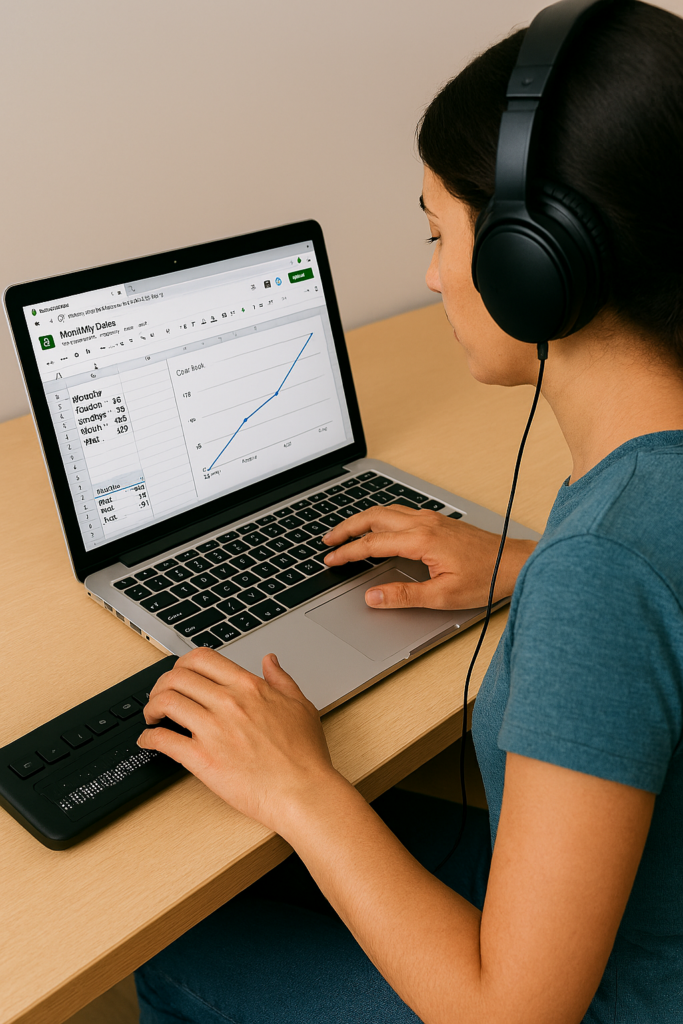
    Access Technology Training lessons: Student creating a Google sheets line graph with screen reader and Braille Display
    Access Technology Training lessons: Student creating a Google sheets line graph with screen reader and Braille Display

    To Every School Administrator, Teacher, and Parent Who has a Child With Vision Loss:

    This is not a suggestion. This is a plea – born from nearly 40 years of professional experience in the field of blindness, visual impairment and access technology, and from the realities of a competitive world that will not slow down and will not make exceptions – that you act now, while there is still time to give your child or student every possible advantage.

    Children who are blind or have low vision are just as intelligent, capable, and ambitious as any sighted child. What they deserve – what they are owed – is the proper set of tools to demonstrate that capability at full speed. Right now, in too many classrooms and homes across this country, those tools are absent, delayed, or introduced far too late. That must change.

    The Foundation: A Windows PC — The World’s Standard Platform

    Windows-based PCs represent approximately 72% of all personal computers in use worldwide. This is not a preference – it is the dominant reality of the workplace, the university, the government agency, and the business world your child will enter. Teaching a blind or low vision child on any other primary platform is preparing them for a world that does not exist at scale.

    Windows is also open and extensible. Unlike closed ecosystems, a Windows PC can be configured, customized, and expanded with virtually any assistive technology available – screen readers, braille drivers, magnification software, speech input – without restriction. It is the most future-proof environment for a child whose assistive needs may evolve over time. One critical requirement, however: the person who teaches your child must be actively using all components of the system themselves every single day, navigating exclusively by screen reader and braille display. You cannot teach what you do not live.

    Every blind or low vision child should be learning on a Windows PC. Period. At the earliest age possible.

    The Tools That Open the World: Screen Readers

    A screen reader converts on-screen text and navigation into speech or braille output, allowing a blind user to operate a computer fully and independently. There are three primary options, each with a distinct role – and a serious student needs fluency in all three.

    JAWS (Job Access With Speech)

    JAWS is the gold standard in professional and educational environments. It offers the deepest compatibility with Microsoft Office, enterprise software, and web-based platforms. For any student planning to enter the professional workforce, JAWS fluency is a career asset. It is the screen reader most commonly encountered in workplaces that have made accessibility accommodations.

    NVDA (NonVisual Desktop Access)

    NVDA is free, open-source, and exceptionally powerful. It is fully supported, actively developed, and used by millions of blind individuals worldwide. For families and schools with budget constraints, NVDA removes every financial barrier to professional-grade access. Students who master NVDA are fluent in a tool used in homes, libraries, and workplaces globally.

    Microsoft Narrator

    Narrator is built directly into Windows and requires no installation. While not as feature-rich as JAWS or NVDA for complex tasks, it is a valuable tool for early introduction, emergency access, and environments where installing additional software is not immediately possible. Every Windows user – blind or not – has access to Narrator the moment they power on their device and complete setup.

    iPhone with Siri and VoiceOver

    No conversation about screen readers is complete without addressing the iPhone. Apple’s VoiceOver, built directly into every iPhone, is one of the most powerful tools available to combine the perfect team of PC with iPhone. It is the device you carry with you every hour of every day. Siri adds hands-free voice control outside class but inside class ability to send a quick SOS to their tech instructor for help keeps them moving. One command on the braille display connected to the computer goes right to the iPhone in their pocket, enables the student to send and SOS tech issue so a remote tech instructor can jump on to solve their issue so they can keep moving in class ASAP.

    In the real world, blind professionals use a Windows PC at their desk and an iPhone in their pocket. Teaching both, from early on, prepares a student for exactly that reality.

    Braille Displays: The Essential Partner to the Screen Reader

    A refreshable braille display connects to a PC and presents on-screen text as braille cells that the user reads with their fingertips to teach spelling, paragraph layout and everything the sighted student does with print. This is not optional equipment for a serious student – it is essential. Reading braille is to literacy what reading print is to a sighted child. Without it, a blind student depends entirely on audio output, which is slower for review, comprehension, proofreading, and deep reading tasks. Beyond speed, a braille display teaches spelling, formatting, punctuation, and document structure in ways that audio alone simply cannot.

    Recommended Displays

    • Focus 40 Blue (Freedom Scientific) — The preferred professional-grade display. Forty braille cells, excellent build quality, seamless integration with JAWS, and trusted in educational and workplace settings worldwide. The 40-cell width allows students to read longer passages without constant panning, dramatically improving reading speed and comprehension.
    • Brailliant BI 40X (HumanWare) — An outstanding alternative with strong multi-device connectivity and a comfortable key layout. Compatible with all major screen readers and well-suited for students who work across multiple devices throughout the school day.

    A 40-cell display – not a smaller 14- or 20-cell model – is strongly recommended for students. The larger cell count significantly reduces the scrolling required and more closely mirrors the experience of reading a full line of text, building the natural reading rhythm that leads to true fluency. For students pursuing STEM fields, an 80-cell display is worth the investment.

    The Hard Truth That No One Wants to Say Out Loud

    A blind or low vision child, without proper tools, cannot complete academic work at the same speed as a sighted child with 20/20 vision. This is not a failure of the child. It is biology and failure of an educational system. It is the reality of navigating a world designed for sighted people without the technology that closes that gap.

    Schools often respond to this reality by granting extended time – double time, time and a half, reduced assignments – on work and exams. And while this accommodation is legally appropriate, it comes with a hidden cost that is rarely spoken aloud: less work assigned means less information learned, and reduced exposure to content creates knowledge gaps that compound over time. The job that child will one day compete for will not reduce its requirements to match. We must look further down the road with clear Vision:

    • Extended time does not exist in a job interview.
    • Extended time does not exist when competing against other applicants for a position.
    • Extended time does not exist when a deadline arrives, a client is waiting, or a team needs output.
    • You learn less in school — and the job will demand more.

    Close the Gap Before It Closes Their Future

    Life is competitive. It has always been competitive. The kindest, most loving thing we can do for a child who is blind or has low vision is to prepare them to compete – not just to participate, but to compete effectively, efficiently, and with confidence, from kindergarten through career.

    The only way to close the speed gap is technology mastered early with braille. A student who has used a screen reader and braille display fluently since early elementary school does not look like a student with a disability when they move through school or enter the workforce. They look like someone who is fast, precise, and capable, because they are.

    Additional Reasons This Cannot Wait

    1. Independence Is Dignity

    A child who relies on a sighted person to read their screen or paper work, describe their assignments, write down their answers, or help navigate their computer is not independent – and they know it. That awareness is not abstract. It settles into them quietly and deeply: the knowledge that someone else is doing for them what they cannot yet do for themselves. It becomes embarrassment. Then frustration. Then, for far too many children, it becomes depression.

    This is one of the most significant and least discussed emotional consequences of inadequate assistive technology instruction. These children are not failing because they lack intelligence or effort. They are failing because they have not been given their tools and they are old enough to understand the difference. Worse they watch their classmates work independently. They watch themselves need help. And over time, that gap between what they can do and what they are expected to do without support begins to define how they see themselves.

    Independence Is the Antidote

    Technology taught by a highly skilled instructor who uses these access tools daily eliminates this dependency. A child who can navigate their own screen, read their own assignments, and submit their own work has done something that no grade or test score can fully capture: they have proven to themselves and others that they can do it. That proof is the foundation of self-worth, confidence, and the unshakeable belief that one can manage one’s own life on one’s own terms.

    Independence is not merely practical. It is the antidote to the depression that follows when a child has been taught, unintentionally, that they cannot.

    2. Early Learning Equals Deep Fluency

    A child who learns a screen reader at age four or five develops the same automatic, effortless relationship with that tool that a sighted child develops with reading text on a page and writing with a pencil. A teenager introduced to a screen reader for the first time is fighting an uphill cognitive battle, learning the tool at the same time they are trying to use it to complete schoolwork. Early adoption eliminates this double burden entirely.

    3. Academic Access Across All Subjects

    A properly configured PC with a screen reader opens every subject: reading, writing, math (with accessible tools like MathML and Nemeth braille, UEB Braille), science, coding, history, art research, everything. Without it, a blind student’s access to the full curriculum depends entirely on the availability of a human aide or specially prepared materials. Technology removes that bottleneck and gives the student direct, independent access to the same content as every other child in the room.

    4. The Job Market Rewards Technology Fluency

    Employers, by and large, do not know what screen readers are. They will not know to provide accommodations they have never heard of and in that gap of understanding, a qualified candidate can lose a job simply because the employer cannot picture how the work would get done.

    A candidate who arrives already proficient changes that entire dynamic. They sit down at a Windows PC, they are productive immediately, and at the right moment they say with confidence: “I want you to know, I am blind, and this is exactly how I do this job.” Then they show it. With speed and efficiency. With no hesitation. That demonstration does more to overcome an employer’s uncertainty than any disclosure form or accommodation request ever could.

    This person competes. The person who has never been properly trained walks into that same room hoping for understanding they may not receive. The difference between those two outcomes is not intelligence. It is preparation.

    5. Post-Secondary Education Expectations

    Colleges and universities have disability services offices, but those offices cannot replace skill. A student who arrives at university without strong assistive technology fluency will spend precious early semesters struggling to catch up on tools rather than engaging with coursework or they will not catch up at all, and fail. Too often, the alternative is that a parent steps in to do the work for them, which is exactly what regularly occurs when students arrive unprepared. Students who arrive already expert in their technology can advocate for themselves effectively, focus entirely on their education, and move forward alongside their peers.

    6. Mental Health and Self-Efficacy

    The psychological toll of constantly needing help of always being the student who requires special arrangements, who cannot do what everyone else is doing is real and cumulative. Technology-empowered students report significantly higher confidence, academic engagement, and willingness to attempt challenging tasks. Giving a blind or low vision child their tools is giving them their identity as a capable person.

    On the Question of Learning Braille: Who, When, and Why

    Braille literacy is one of the strongest predictors of academic success and employment for blind individuals. The research on this is not subtle, it is decisive. But the question of who should learn braille is not always straightforward, and it must be considered carefully in the context of each child’s specific diagnosis.

    Children Who Are Fully Blind

    There is no question. Braille instruction should begin immediately, ideally by age three, and no later than the beginning of formal schooling. Braille is their print. Delaying braille for a blind child is the equivalent of delaying reading instruction for a sighted child. Every year of delay compounds into a literacy deficit that becomes harder to close.

    Children With Low Vision

    This requires careful evaluation in partnership with the child’s ophthalmologist and prognosis. Three key questions must guide the decision:

    • Is the condition stable or progressive? If progressive, the answer is clear: begin braille instruction immediately, regardless of how much vision the child currently has.
    • Can the child read print efficiently at a rate and comfort level that matches a child with 20/20 vision? If not, print alone is not sufficient and braille must be part of the plan.
    • Is the child’s functional vision expected to remain sufficient throughout their lifetime? If there is any reasonable doubt, begin braille now. It is far easier to have a skill and not need it than to need a skill and not have it.

    When Braille Starts Late

    • What if the child is older and braille instruction is only beginning now? Research is unambiguous on this point: students who begin braille instruction after 6th grade rarely achieve functional reading fluency. The tactile sensitivity, finger dexterity, and automatic cell recognition that true braille literacy requires develop in early childhood. That window is largely closed by the time a child enters middle school, and full literary braille instruction after that point becomes, in most cases, an exercise in frustration for both the student and the instructor.
    • For the older student who is past that window, the goal must shift to functional braille, what they will actually use in daily life: device navigation, labels, signage, reference points, and targeted reading tasks. Trying to force full literary braille on a resistant older student creates a battle you will not win. You will spend more time fighting than teaching. Focus on usefulness. Motivation follows. And in every case, a PC with a screen reader and braille display becomes the central key to that student’s success going forward.

    If the Condition Is Progressive: Braille Is Not Optional

    If a child has a progressive eye condition – retinitis pigmentosa, Stargardt disease, glaucoma, or any diagnosis with a trajectory toward increasing vision loss – braille instruction must begin immediately, regardless of how much usable vision the child currently has. Here is why:

    • Braille is most easily and deeply learned when taught young, when the brain’s neuroplasticity is at its peak, just as with learning any other language. The earlier the exposure, the deeper the fluency.
    • A child who waits until their vision has deteriorated significantly is learning braille at the same time they are grieving a loss: an emotionally devastating combination that slows learning or stops it entirely.
    • A teenager or adult who must learn braille after vision loss faces a steep, stressful acquisition curve that can take years to develop into functional fluency.
    • A child who learns braille at age three or four and uses it throughout their education will be functionally fluent by the time their vision deteriorates, ready, not scrambling.

    Teaching braille to a child who still has usable vision is not pessimism. It is planning. It is love with foresight.

    The Crisis That Arrives in Middle School

    Every summer, TechVision receives calls about blind and low-vision students who are beginning to fall behind significantly. In most cases, blind children have no technology at all, and low-vision students lack both technology and braille instruction. By middle school, the academic demands increase sharply, the volume of reading and writing grows, and students are expected to manage far more digital work on their own, and they cannot.

    For students with progressive low-vision diagnoses, middle school is often the point where remaining vision no longer allows them to complete work efficiently, even with low-vision tools. At that point, they are not only trying to keep up academically. They are also trying to learn braille, screen-reader skills, braille-display use, keyboarding, file management, accessible math, and online platform navigation, all at the same time. The academic and the remedial collide, and the student is caught in the middle.

    That is why early instruction matters. Waiting until a student begins failing creates an avoidable crisis. Teaching braille and technology before the crisis gives the student time to build fluency, confidence, and independence.

    The Timeline: What the Research and Experience Tell Us

    • Age 3: The ideal starting point. Children at this age learn through play and exploration and absorb braille as naturally as sighted children absorb picture books and letters (include a cane here also). Tactile literacy can begin before formal reading instruction in other areas. Introduce them to a PC with a screen reader and braille display through play. By age four, begin teaching touch typing. Done consistently, a child is ready to begin kindergarten already equipped.
    • Kindergarten through 2nd grade: Still an excellent window. With intensive, consistent instruction, a child can achieve strong foundational literacy by early elementary school.
    • 3rd through 5th grade: Still achievable but increasingly challenging. By this stage, the child is already behind in braille literacy relative to academic demands. Intensive TVI/Tech support is essential and must begin immediately. Think summer time instruction-always.
    • Middle school and beyond: Braille can and should still be taught, but the window for achieving deep, automatic fluency is narrowing. Every year of delay past 5th grade represents a harder road. Shift the focus to functional braille and technology mastery.
    • When a school district first receives a blind or low vision student at any age: Instruction in assistive technology and braille (where indicated) must begin on day one: not after evaluation periods, not after IEP meetings have stretched across months or years. The clock is running from the moment that child walks through the door. Day one.

    What We Are Asking You to Do

    For School Districts:

    • Ensure every blind or low vision student has immediate access to a Windows PC configured with both NVDA and JAWS, connected to a 40-cell refreshable braille display and paired with a highly skilled instructor who uses these tools daily.
    • Hire TVIs and assistive technology instructors who are genuine daily users of the technology they teach. A degree or certification alone does not qualify someone to teach JAWS, NVDA, or a braille display. Technology fluency is not academic knowledge, it is muscle memory. It is the ability to troubleshoot in real time, demonstrate at speed, and anticipate where a student will struggle because you have been there yourself. A Teacher of the Blind and Visually Impaired (TVI) who does not use this technology every single day cannot teach it well, regardless of what their diploma says.
    • Coordinate braille and technology instruction as one integrated program, not two separate tracks. When these skills are taught together on the same device, they reinforce each other and the student learns faster. If a TVI is a strong braille teacher but does not have deep technology expertise, the right answer is to pair them with a qualified assistive technology instructor who does. Integration from one highly skilled person is the ideal; a strong partnership between specialists is the practical alternative. One person doing both poorly serves no one.

    Begin NOW

    • Begin braille instruction for eligible students immediately upon enrollment, not pending further evaluation, not after the next IEP meeting, not once the “right” TVI is located. Interim solutions are acceptable. Delay is not.
    • Embed assistive technology instruction into the student’s daily academic life as the primary mode of access, not as a pull-out supplement. Remote instruction is a powerful and underutilized tool: a qualified technology instructor can be present in the classroom via headset and screen share, guiding the student in real time without disrupting the class, while the student remains fully included with their peers. When pulling a student out is unavoidable, choose the one hour of the school day that causes the least disruption to their social and academic integration. These students are already navigating more than their sighted peers. Do not add social isolation to that burden.
    • Measure student progress in assistive technology fluency with the same rigor applied to reading, math, and every other subject. The student completes all work on the PC. They email completed assignments to the teacher. The teacher places feedback directly in the document using Word comments and emails it back. This is not a workaround, this is the workflow. It is clean, professional, and mirrors exactly how the working world operates. It holds the student to the same standard of output and accountability as every other person in the room.

    For Parents:

    • Do not wait for the school to take the lead. Advocate immediately and loudly for your child’s right to assistive technology and braille instruction.
    • If your child has a progressive eye condition, contact a TVI and assistive technology specialist today about beginning braille instruction, regardless of your child’s current functional vision level.
    • Set up a Windows PC at home with NVDA (free to download) and have your child use it for reading, homework, and exploration every single day.
    • Connect with the National Federation of the Blind, the American Foundation for the Blind, and your state’s Blind and Low Vision Services for resources, advocacy support, and community.
    • Believe, fiercely and without apology, that your child can compete. Then make sure they have the tools to prove it.

    The Future Is Waiting. Start Today.

    The child who is three years old today and begins braille and assistive technology instruction this year will walk into their first job interview at age twenty-two as a fully equipped, confident, and capable professional. The child who waits may walk in hoping for accommodations they may not receive, competing at a speed they were never trained to reach.

    The tools exist. The research is clear. The need is urgent. All that is required is the will to act: now, not later, not after one more evaluation, not after the next IEP cycle. Now.

    Every blind and low vision child deserves to compete. Give them the tools to do it.

    Key Resources

    NVDA Screen Reader (Free): www.nvaccess.org

    JAWS Screen Reader: www.freedomscientific.com

    National Federation of the Blind: www.nfb.org

    American Foundation for the Blind: www.afb.org

    HumanWare Brailliant Display: www.humanware.com

    Freedom Scientific Focus 40 Blue: www.freedomscientific.com

    Go to All Tech Lessons & Stories

    Let us know how we can help you: Contact US: TechVisionTraining@yourtechvision.com