Search results for: “low vision”

  • Download books from BARD for Braille and Audio Reading

    Download books from BARD using The NLS BARD website or Phone app, which offers Braille and audio reading materials for the blind and print disabled. Users need a login ID and password to access the site. Eligible users can download books from BARD, magazines, and other materials. The site supports various browsers, including Internet Explorer, Chrome, Safari, and Firefox. If you need help with any instruction, let us know.

    BARD website login page for downloading books
    BARD website login page for downloading books

    BARD Mobile apps are available for iOS, Android, and Fire tablets. These apps allow users to access Braille and talking books on their devices. BARD Express simplifies searching, downloading, and managing audio materials on Windows. Once on computer you can change how you see the books also.

    The website ensures accessibility with tested compatibility for screen readers. Users must agree to a pledge to use the service. The NLS BARD service enhances access to reading materials, promoting literacy and independence for the blind and print disabled.

    Other Useful Sites for Learning More

    Learn Out Loud Reading-Audio books Galore

    Search HathiTrust’s Digital Library

    Project Gutenberg Self-Publishing – eBooks | Read eBooks online | Free eBooks

    Braille Reading Speed Standards

    (1) BARD: Braille and Audio Reading Download – nlsbard.loc.gov. https://nlsbard.loc.gov/login/NLS.

    (2) Welcome to BARD – National Library Service for the Blind and Print …. https://www.loc.gov/nls/how-to-enroll/sign-up-for-bard-and-bard-mobile/welcome-to-bard/.


  • Inclusive Multi-Sensory Learning Tools

    Sensational Books offers Inclusive Multi-Sensory Learning Tools. These tools provide a multi-sensory approach to early learning, focusing on tactile and visual experiences. Their products include books and tools designed for both sighted and visually impaired children. For example, “Sadie Can Count” is a children’s book with large print, Braille text, and fully embossed pictures. This book helps beginning readers, including those with visual impairments, to enjoy reading with their friends and family.

    Inclusive Multi-Sensory Learning- from sensational books
    Inclusive Multi-Sensory Learning- from Sensational Books

    Another notable product is the Sensational BlackBoard, which allows users to create raised-line drawings. This tool is lightweight, portable, and uses standard copy paper and a ballpoint pen. It’s designed to help users feel their drawings as they create them, making it an excellent resource for both new and experienced artists.

    Sensational Books also offers workshops and tactile artwork, promoting sensory integration and early literacy. Their products are suitable for diverse populations, including Montessori students and children with autism. The website provides a comprehensive overview of their offerings, including detailed product descriptions and testimonials from users. Some users need other types of tactile tools also.

    One example is Sensational BlackBoard which offers a fun, fast, easy and inexpensive way to get tactile access to images. Draw your own raised line pictures or you can have photo copy images of text book or research materials quickly traced. More on this site for Inclusive Multi-Sensory Learning Tools. Make sure you incorporate audio reading as a skill to add to braille reading.

    More information and lessons at: TechVision YouTube

  • Tactile Math Learning Tools–Math Window

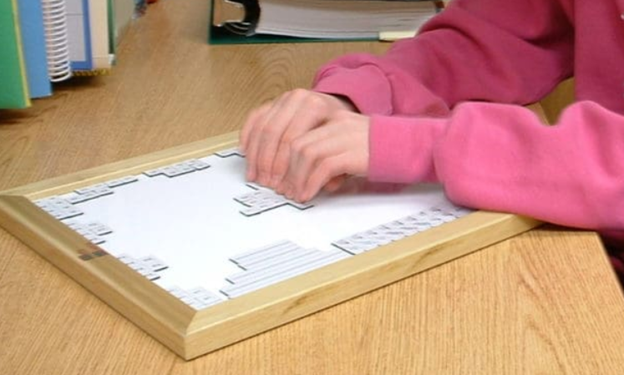
    The Math Window® system is a tactile math learning tool that is an innovative teaching tool for blind and visually impaired students. It uses magnetic tiles with Braille and print. This allows students to interact with math problems using tactile methods. Instructors and students can construct and modify equations by arranging these tiles. The board is portable and fits on a student’s desk. It includes a carrying tote for convenience. Available versions cover basic math, algebra, and geometry. Math Window supports Nemeth and UEB Braille standards.

    The Math Window® system empowers students to engage actively with math. This enables them to learn how to output their math work on a computer using WORD. It offers a hands-on, tactile learning experience. The magnetic board and tile system supports understanding math problems in various disciplines. Students can create equations and move the magnetic tiles to explore concepts. They can easily modify or adjust their work as needed. The system’s adaptability allows instructors to personalize lessons. This enhances students’ independence in solving math problems.

    Tactile Math Learning Tools in Nemeth and UEB Math

    Math Window provides two key Braille formats: Nemeth and UEB. This ensures compatibility with the Braille system used by the student. This flexibility makes it accessible in both educational and real-world settings. With tactile interaction, blind students can “see” math equations’ structure. This method builds confidence and encourages students to delve into STEM subjects.

    The portability of the Math Window system allows ease of use in classrooms and homes. Instructors benefit from a clear, organized way to present math problems. Students can efficiently explore and manipulate the problems. This increases their engagement with the material. Whether working individually or in groups, the Math Window fosters a collaborative learning environment.

    Using tactile math learning tools such as the Math Window, The student 'visualizes' the layout of a math formula by exploring it with their fingers.
    Using tactile math learning tools such as the Math Window, The student ‘visualizes’ the layout of a math formula by exploring it with their fingers.

    Math Window View

    Order products at: Math Window

  • Perfect Brailler for children with little fingers: Mountbatten

    Perfect Brailler for little children: Children often struggle to press the keys on a regular brailler due to their small fingers. That’s why I recommend the Mountbatten brailler.

    I’ve introduced students as young as 3 years old to the Mountbatten brailler. They can braille with perfect finger positioning using this device.

    Mountbatten- Perfect Brailler for Kids
    Mountbatten- Perfect Brailler for Kids

    We want to be careful when letting young children use the regular brailler so they don’t start poor brailling habits, such as using 2 fingers to press one key. This is not only time consuming, but also very slow because it takes so much effort to press the keys. The Mountbatten brailler, however allows for good habits to form while fingers are growing and getting stronger. Starting out correctly, our children will then be successful braillers with an ability to increase their output as they get older, creating a joy in reading what they wrote. This will lead to learning perfect touch typing on a keyboard and using a braille display on a computer. Then onto learning math on the brailler to moving it to the computer

    Perfect Brailler for Kids: Versatile and User-Friendly

    The video on the Math Window® system provides an in-depth look at how this tool benefits blind and visually impaired students. Here are some key details:

    1. Magnetic Tiles: The system uses magnetic tiles that feature both Braille and print. This dual-format approach allows students to read and interact with math problems tactilely.
    2. Portability: The Math Window® board is designed to be portable. It fits easily on a student’s desk and comes with a carrying tote, making it convenient for use in different settings.
    3. Versatility: The system is available in various versions, including basic math, algebra, and geometry. This versatility ensures that it can be used across different levels of math education.
    4. Braille Standards: Math Window® supports both Nemeth and UEB Braille standards. This compatibility ensures that it can be used by students who are familiar with either Braille system.
    5. Hands-On Learning: The tactile nature of the Math Window® system allows students to engage with math problems in a hands-on manner. This method helps in building a deeper understanding of mathematical concepts.
    6. Adaptability: Instructors can easily personalize lessons using the Math Window® system. They can arrange and modify the magnetic tiles to suit each student’s learning pace and needs.
    7. Confidence Building: By allowing students to “see” the structure of math equations through touch, the system helps build their confidence. It encourages them to explore STEM subjects more independently.
    8. Collaborative Environment: The system fosters a collaborative learning environment. Students can work individually or in groups, making it suitable for both classroom and home use.

    The Math Window® system makes an Ideal Brailler for Children with more Math lessons here

    Add keyboarding skills in also as students learn to braille and tactile math tools as learning is all encompassing

    Contact Team Specialists to help you set up a program