
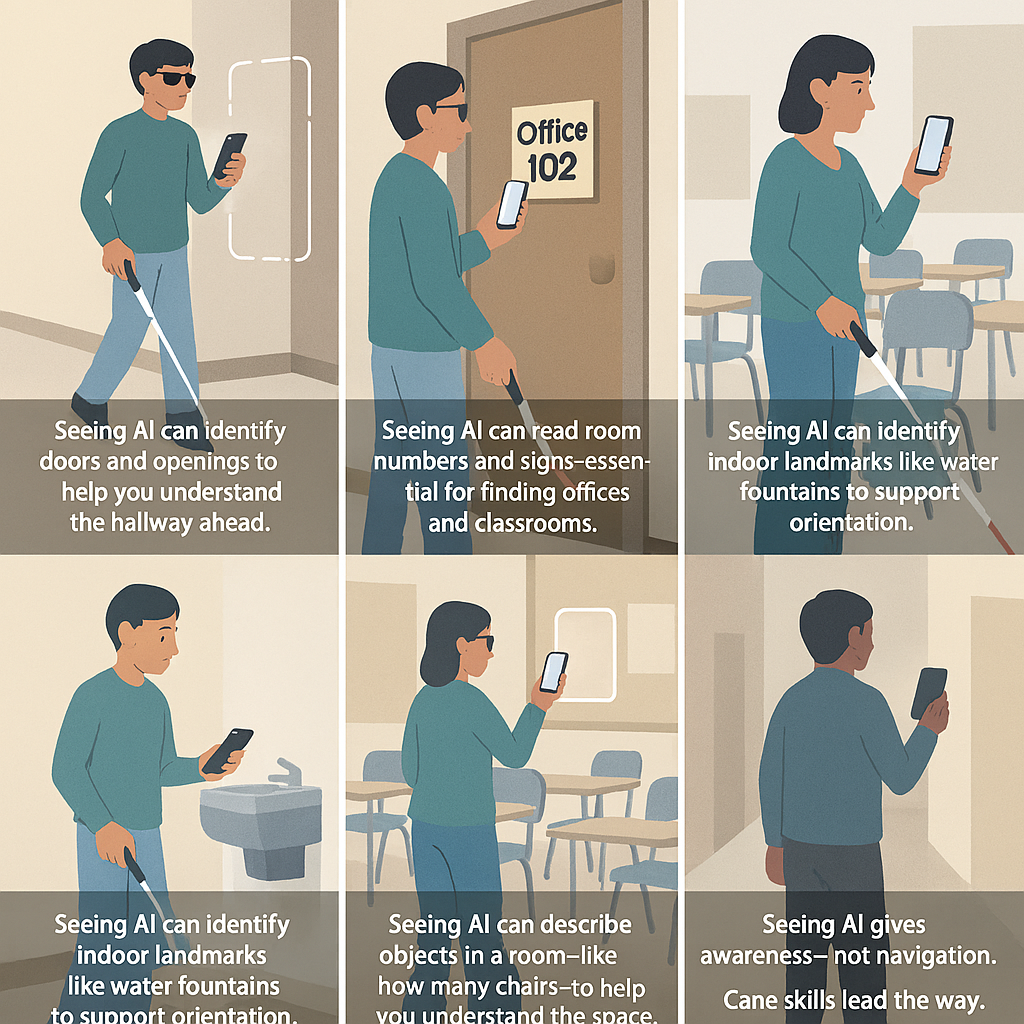
At this time, there is no fully reliable indoor navigation app that works in all buildings without special equipment such as QR codes, Bluetooth beacons, or professional indoor mapping. GPS does not function accurately indoors, and current mobile apps cannot provide turn‑by‑turn indoor directions. Indoor Navigation for Blind Users remains a significant technical challenge due to these limitations.
However, Seeing AI is the closest tool we have for indoor orientation that you can use immediately. It can describe rooms, identify doors, read signs, and recognize objects. When combined with strong cane skills, Seeing AI gives blind travelers meaningful visual feedback that supports safe and confident movement inside any home, school, or building. AND most importantly, can use anywhere and immediately.
Lesson: Indoor Navigation for Blind Users Using Seeing AI – (iPhone)
Skills: Indoor navigation, route following, spatial awareness, tech + cane integration
Tools: iPhone with Seeing AI, long cane, school hallway or building
Lesson: Indoor Orientation Using Seeing AI
What it CAN do, what it CANNOT do, and how blind travelers can use it safely and effectively.
Strong cane travel skills are the foundation of safe and independent mobility. Great cane training will always take you where you need to go. Seeing AI can add helpful information about the environment, but it is the cane that provides the reliable, real‑time feedback a blind traveler depends on.
Skills: Indoor orientation, environmental awareness, object identification, sign reading, cane + tech integration
Tools: iPhone with Seeing AI, long cane, any indoor environment
Lesson Overview
Seeing AI is not an indoor navigation app.
It does not map buildings, create routes, or give turn‑by‑turn directions.
But it is the most powerful indoor visual feedback tool available today for blind travelers — and when paired with strong cane skills, it becomes a reliable way to:
- identify rooms
- confirm locations
- understand layout
- detect doors and openings
- recognize objects
- read signs
- build mental maps
This lesson teaches students how to use Seeing AI as an indoor orientation partner, not a navigation system.
Learning Objectives
By the end of this lesson, the student will be able to:
- Use Seeing AI to identify doors, signs, and room numbers
- Use the World and Scene channels to understand layout
- Use Short Text to read labels, signs, and posted information
- Use object recognition to identify furniture and landmarks
- Combine cane skills + Seeing AI feedback to move safely
- Understand the limits of Seeing AI indoors
- Use Seeing AI as a supplement, not a replacement, for O&M skills
What Seeing AI CAN Do Indoors
Describe what the camera sees
- furniture
- doors
- hallways
- people
- objects
- appliances
- stairs
- obstacles
Read signs and room numbers
- classroom numbers
- office signs
- restroom labels
- posted instructions
- bulletin boards
✔ Identify objects and landmarks
- tables
- chairs
- vending machines
- water fountains
- cabinets
- shelves
✔ Help build a mental map
By scanning left, right, and ahead, the student can understand:
- where openings are
- where walls are
- where intersections are
- where furniture is located
✔ Confirm they’ve reached the correct room
Short Text + Scene = “Yes, this is Room 214.”
✔ Support safe indoor travel when paired with cane skills
Seeing AI gives visual information.
The cane gives tactile information.
Together, they create a complete picture.
What Seeing AI CANNOT Do Indoors
❌ It cannot navigate
turn‑by‑turn directions or indoor routes.
Nor give hallway guidance.
❌ It cannot map a building
No saved indoor locations, or indoor POIs.
No floor detection.
❌ It cannot guide you back to a room
Markers and audio beacons are GPS‑based and only work outdoors.
❌ It cannot detect exact indoor positions
GPS accuracy indoors is too poor.
❌ It cannot replace cane skills
It supplements orientation — it does not provide mobility.
“Seeing AI helps you understand what’s around you indoors. It can describe rooms, read signs, and identify objects. It cannot guide you like a GPS, but it gives visual information that supports your cane skills.”
Explore the World Channel
Explore
- hold the phone at chest level
- slowly scan left to right
- listen to descriptions
Listen for:
- “What openings do you hear?”
- “What objects are in front of you?”
- “What does it say about the hallway?”
Identify Doors and Openings
Use the camera to:
- find doorways
- detect open vs closed doors
- identify intersections
- confirm hallway direction
Think about:
- “Where is the door located?”
- “Is it open or closed?”
- “What does your cane confirm?”
Read Room Numbers and Signs
Switch to Short Text.
Now
- locate room numbers which should have braille
- read office signs
- read restroom labels
- read posted instructions
This builds literacy + orientation.
Object Identification
Use the Describe to identify:
- tables
- chairs
- cabinets
- appliances
- vending machines
- water fountains
- anything
Think about
- “What object did it identify?”
- “How does that help you understand the space?”
Build a Mental Map
Walk a hallway or room.
- scan ahead
- scan left
- scan right
- use cane to confirm
- describe the layout
Then combine:
- visual feedback
- tactile feedback
- spatial reasoning
Reflection
- “What did Seeing AI help you understand?”
- “What did your cane tell you that Seeing AI didn’t?”
- “How did the two work together?”
- “What can Seeing AI NOT do indoors?”
This reinforces realistic expectations.
If you are teaching this here is an Assessment Checklist
Student demonstrates mastery when they can:
- Identify doors and openings using Seeing AI
- Read room numbers and signs
- Identify objects and landmarks
- Build a mental map of a hallway or room
- Use Seeing AI + cane skills together
- Explain what Seeing AI cannot do indoors
Teacher Notes
- Seeing AI is the best indoor orientation tool available today
- It is NOT indoor navigation
- It gives visual information, not directions
- It works in any building
- It supports independence when paired with cane skills
Other iPhone Lessons
- iPhone: Set Up Face ID, Touch ID, and Passcode with VoiceOver
- iPhone-Setting Up Email Using Siri & VoiceOver
- Using VoiceOver to Learn What You Can Do in an App
- iPhone Setup: Turning On Siri and VoiceOver
- Aira Navigation: How Blind Travelers Navigate Safely and Independently
- Blind Users Retrace Indoor Routes with Clew
- Indoor Navigation for Blind Users: Using Seeing AI with iPhone
- Complete Indoor & Outdoor iPhone Navigation for Blind People: 7 & 8
- Indoor Navigation for Blind People with Seeing AI App 9
- Teach the Compass and Route Memory for Indoor Orientation 5 & 6
- Drop Pins and Navigate with Maps