
Understanding Linear Learning vs. Spatial Learning
When people ask, “How do blind students learn?” the most important starting point is this:
Blind students learn linearly. Sighted students learn spatially.
This single difference explains why blind learners need different teaching strategies, different tools, and different test accommodations: not because they are less capable, but because they access information through a completely different pathway.
Let’s break down what this means, why it matters, and how it affects everything from classroom instruction to standardized testing.
1. Spatial Learning (Sighted Students)
Sighted students take in information all at once, in a broad visual field. They can:
- Glance at a page and see the whole layout
- Jump between paragraphs instantly
- Scan charts, maps, and diagrams in seconds
- Compare two areas of a page without losing their place
- Hold visual relationships in mind (left/right, above/below, bigger/smaller)
This is spatial learning — fast, simultaneous, and visually anchored.
2. Linear Learning (Blind Students)
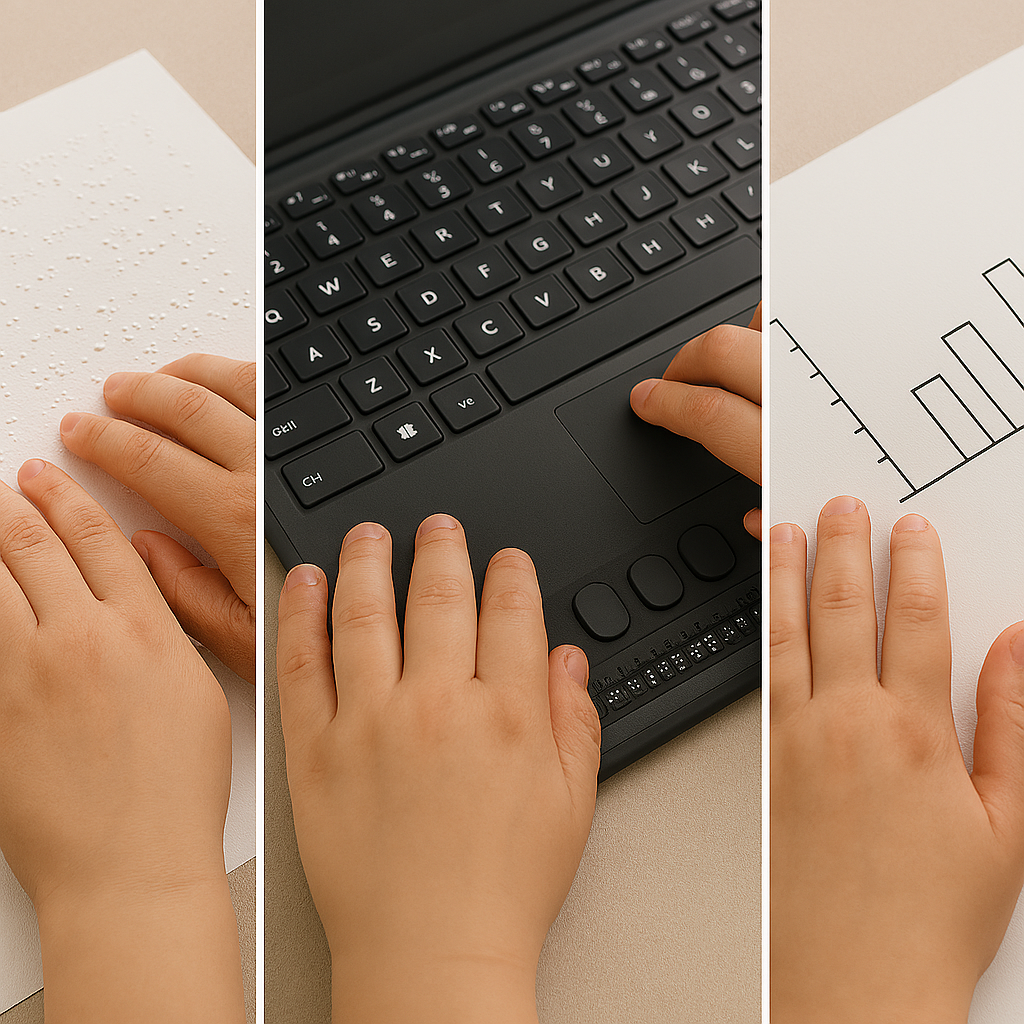
Blind students access information one piece at a time– one character at a time, in a straight line, through:
- Screen readers (JAWS, NVDA, VoiceOver)
- Braille displays
- Audio
- Tactile graphics
They cannot “look around” a page or see the question and the paragraph all at the same time, nor skim a diagram. They must:
- Move character by character or part by part
- Move line by line
- Navigate with commands
- Build the mental picture sequentially
- Hold details in working memory
This is linear learning — accurate, powerful, but fundamentally different from spatial learning.
Braille readers who build fluency up to 400–450 words per minute — and some even higher — can move through text quickly, but they still must slow down when deep comprehension is required. In parallel, trained blind students can listen at speeds well above 400 words per minute. Because audio processing becomes a major access route for academic content, teaching efficient high‑speed listening is an essential skill alongside Braille fluency.
This instruction must begin early if the goal is for the child to maintain pace with sighted peers, as early tactile and access‑skills training prevents the academic delays that occur when these foundations are introduced later. This includes early keyboarding instruction and learning to use a PC computer with screen reader commands, both of which are essential access tools for blind students throughout school and into adulthood.
For blind children, it is essential to start developing tactile readiness, tactile discrimination, and early Braille concepts by age 3. These foundational tactile skills support later Braille fluency, spatial understanding through touch, and efficient access to academic materials.
For children with low vision and a progressive eye condition, instruction should begin as soon as the condition is identified — not after vision loss occurs. Early access training ensures the child builds the skills they will rely on later, preventing academic delays and reducing the emotional and cognitive burden of “catching up” after vision decreases.
Early instruction in tactile skills, Braille readiness, and high‑speed listening lays the groundwork for the advanced literacy and access skills blind students need throughout school and into adulthood.
3. Why This Matters in Real Learning Situations
A. Refer‑Back (Test) Questions
Many work but especially standardized tests require students to:
- Read a question
- Refer back to a paragraph
- Return to the question
- Choose the correct answer
Sighted students do this in seconds because the question and paragraph are both visible at once.
Blind students must:
- Stop reading
- Navigate backward through headings or lines
- Find the correct paragraph
- Reread it
- Navigate forward again
- Try to remember both the question and the paragraph
This is not a reading‑comprehension task — it becomes a navigation and memory task.
Why it’s inaccessible
- Screen readers present content linearly, not spatially.
- Blind students lose the visual proximity sighted students rely on.
- Cognitive load doubles because they must juggle navigation + content.
- They lose significant time through no fault of their own.
Appropriate accommodation
On the student’s IEP (Individualized Education Program), include a sighted human reader as an accommodation. This restores equal access by allowing the student to:
- Braille students has fingers on a braille display if test is electronic or on hard copy braille then
- Asks reader for the referenced paragraph
- Answers immediately based on knowledge, not navigation
This is not an advantage — it is equivalent access.
B. Image‑Based Test Questions
Charts, diagrams, maps, graphs, and labeled pictures are inherently spatial.
Sighted students can instantly see:
- Layout
- Labels
- Patterns
- Relationships
- Direction
- Relative size
Blind students cannot access any of this unless the description is complete — using methods appropriate for blind learners, since most tests are created by sighted people using sighted terms rather than blind terms — and, most importantly, unless they have been explicitly taught how to “read” and interpret graphs through tactile and auditory methods. This is also where a sighted human reader becomes essential, someone who knows the student and can relay information using blind‑appropriate terminology and concepts.
Why inadequate alt text fails
Alt text like:
- “A chart”
- “A diagram of a cell”
- “A map of the U.S.”
…provides none of the information needed to answer questions.
Screen readers cannot “see” the image. They only read the text provided. If the description is incomplete, the student receives incomplete information — and cannot answer accurately.
Appropriate accommodation
A trained sighted describer, with tactile graphics when appropriate, can:
- Describe the full spatial layout as student moves their hands across the graphic
- Identify labels and relationships
- Provide the structure needed to understand the image
- Support the student without giving away answers
This ensures the blind test taker has access to the same information sighted peers see.
4. What Teachers and Parents Need to Know
Blind students are fully capable of mastering the same academic content — when the information is delivered in a way they can access.
To support linear learners:
- Present information in clear, sequential linear order
- Avoid “look at the chart above” without providing a full description
- Use headings, structure, and consistent formatting
- Provide tactile graphics for spatial concepts
- Teach screen reader navigation explicitly
- Allow extra time for tasks that require back‑and‑forth reference
- Use human readers or describers when needed
These are not “extras.” They are equity.
5. Why This Matters for Every Classroom and Every Test
When educators understand the difference between linear and spatial learning, everything becomes clearer:
- Why blind students need more time
- Why they need tactile graphics
- Why they need structured digital materials
- Why refer‑back questions are inaccessible
- Why image‑based items require human description
- Why blind students may appear “slower” when they are actually processing more steps
Blind students are not struggling with content — they are navigating a world built for spatial learners.
6. Final Thought
Blind students learn differently, not less.
Their learning is sequential, structured, and deeply conceptual.
When we remove the visual barriers, their abilities shine.