Category: stories

  • When Community Speaks Inclusion: Lessons from Martha’s Vineyard


    Nora Groce’s Everyone Here Spoke Sign Language unveils a remarkable chapter in American history—one where deafness was not a barrier but a shared experience that shaped an entire community. When community speaks inclusion, it mirrors the story on Martha’s Vineyard, where hereditary deafness was so prevalent from the 17th to early 20th century that both deaf and hearing residents used a local sign language fluently. This wasn’t mere accommodation, it was full integration. Deaf individuals were farmers, business owners, and civic leaders, participating in every facet of island life without stigma or exclusion. Everyone lived with the same level of opportunity, prosperity, and respect.

    The power of Groce’s work lies in how it re-frames disability. Rather than viewing deafness as a deficit, the Vineyard community treated it as a natural variation—imagine how transformed our world could be if this were the universal norm, where every individual, regardless of ability, identity, or mode of expression, was fully embraced as part of the whole.
    Because sign language was a common tongue, communication barriers dissolved. Groce’s anthropological lens reveals how societal norms can shift when inclusion is built into the very fabric of daily life. Her research challenges the assumption that disability must isolate or marginalize, showing instead that community attitudes and shared language can foster belonging and equality.

    What’s especially striking is how this story contrasts with the broader societal treatment of deaf individuals. In most places, deafness (or any difference) often leads to exclusion. But on Martha’s Vineyard, it was simply part of the landscape. Groce’s book doesn’t just document a historical anomaly—it offers a vision of what’s possible when accessibility is embraced not as an afterthought, but as a cultural standard. It’s a testament to the transformative power of language, empathy, and intentional community design.

    How Community Inclusion Can Transform Our World

    Groce’s exploration of Martha’s Vineyard presents a bold alternative to the conventional narrative surrounding disability—a model where accessibility wasn’t patched in, but foundational. If global communities embraced total integration, the impact on social cohesion and individual empowerment would be profound. In such a world, variation wouldn’t prompt isolation or pity, but curiosity, inclusion, and respect. The concept of “special help” would no longer signal separation—it would reflect a shared, proactive responsibility built into every system: education, public services, employment, and human relationships.

    Sea front of Martha's Vineyard from Groce's book
    Sea front of Martha’s Vineyard from Groce’s book of everyone spoke sign language

    It would become second nature—from our youngest children onward—to include everyone naturally in play, friendship, partnership, employment, and beyond. Inclusion wouldn’t require explanation; it would be the norm. If everyone adopted this philosophy, children would grow up valuing variation as a strength, not an obstacle. They would instinctively practice belonging—from playgrounds to classrooms, careers to family life—just as this story shows.

    Imagine

    Imagine societies where children grow up fluent in multiple forms of communication and warmly embrace every human variation, whether in how we learn, move, connect, or express ourselves. When society values these variations as strengths, the ripple effect touches every part of life. Daily living becomes richer when everyone can participate fully and authentically, without barriers or apologies. Inclusion fosters psychological safety by empowering people to contribute, thrive, and belong because of their uniqueness.

    In such a world, relationships deepen, communities flourish, and innovation accelerates. People feel seen, valued, and trusted, nurturing mental health and mutual respect. Productivity grows—not through uniformity, but through the vibrant mosaic of diverse thought, skill, and experience. From a bus ride to a boardroom, each interaction becomes an opportunity for shared understanding. That’s not just an update to infrastructure—it’s a re-imagining of humanity itself.

    Reflection

    This reflection was born from a sermon by Tim Keller, where he shared the story of Martha’s Vineyard as a living metaphor for the kind of friendship Jesus offers—a friendship that embraces everyone, regardless of variation or circumstance. Keller reminded us that true community doesn’t erase difference; it welcomes it, just as Jesus did. That message stirred something deeper in me, especially as someone who has taught blind students for nearly forty years. Each day, I see the transformative power of technology—not as a workaround, but as a bridge—helping students connect and grow with their peers in a world designed for collective inclusion. The heart of Christianity, and the life of Jesus, is centered on grace: an invitation extended to all, without condition. That same grace calls us to build communities where every person feels seen, valued, and welcomed—not as an exception, but as a friend.

    Inclusion

    When embraced as the norm and infused with grace, doesn’t just reshape systems—it redefines humanity, reminding us that every variation is not a barrier but a sacred invitation to belong. When everyone is included, due process can become a thing of the past
    Raveena: Olympic Blind Student Paraclimbing: Defying Limits

    Blind Baseball Announcer Keith Bundy Lives his Dream –

  • Preventing Due Process, upholding Rights

    The way to prevent due process for blind and visually impaired students is by proactively addressing their specialized needs. Ensuring compliance with FAPE (Free Appropriate Public Education) is essential. This fosters an educational environment that gives full access to all students. For blind and visually impaired students, this means specialized instruction using access technology, Braille, Nemeth/UEB Math, tactile tools, and more. TechVision ensures the right team is in place to teach your child in real time. Students learn exactly what their peers are learning. They use a PC computer, screen reader, and Braille display. They receive remote instruction from a TechVision staff member. This can be in their room or in a session with their TVI and transcriber.

    TechVision Staff educate teachers on accessibility and train transcribers to make work accessible. Additionally, they help schools and parents understand what access to education truly means. Consequently, this approach enables schools and parents at home to support the independence of blind children. When these supports and accommodations are in place, visually impaired students can fully access their education and home environment, but ONLY with appropriate Access Technology Instructors.

    Appropriate Instructors mean Access Instructors can totally use the technology themselves in all areas and subjects with keyboard commands, screen readers and braille display. As a result, students experience inclusion and have their right to a Free Appropriate Public Education (FAPE) upheld. Everything together allows FAPE. The right tools are nothing without proper instruction with it. Ultimately, this stops due process if it has begun or prevents it before it gets to this point. By utilizing these strategies, parents and schools play a crucial role in preventing any due process issues from arising.

    Knowledgeable Instructors the STOP Due Process

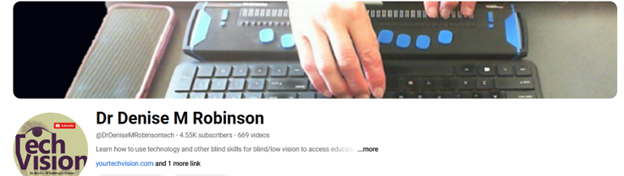
    TechVision, LLC, led by Dr. Denise M. Robinson, specializes in providing comprehensive educational services for blind and visually impaired students. Here are some ways TechVision can help prevent issues related to FAPE (Free Appropriate Public Education) violations:

    1. Specialized Instruction: TechVision offers 1:1 remote instruction in technology, Braille, Nemeth code, and other blind skills. This ensures that students receive the necessary support to access their education effectively.

    2. Collaboration with Schools: TechVision works closely with school districts, teachers, and other educational personnel to ensure that the needs of visually impaired students are met. This collaboration helps in creating an inclusive learning environment.

    3. Training for Educators: TechVision provides training for school teams, including transcribers and teachers of the blind. This training equips educators with the skills and knowledge needed to support visually impaired students.

    4. Advocacy and Support: TechVision advocates for the rights of visually impaired students and ensures that their educational needs are addressed. This includes working with families and schools to develop and implement appropriate educational plans.

    5. Use of Technology: By leveraging cutting-edge technology, such as screen readers, Braille displays, and other assistive tools, TechVision empowers students to access information and navigate their education on an equal footing with their sighted peers.

    By providing these services, TechVision helps ensure that visually impaired students receive the education they deserve, while also supporting parents and schools in creating an inclusive and effective learning environment. By providing these services, TechVision can help prevent FAPE violations and ensure that visually impaired students receive the education they deserve.

    We are dedicated to resolving FAPE challenges in schools, ensuring that every student receives the education they need to access their education fully by supporting teachers, and helping schools on this exciting path to full inclusion.

    Investing in Education: Redirecting Funds for Maximum Impact

    When funds are no longer tied up in pre-process meetings or due process proceedings, they can be redirected to directly benefit students and teachers. This means more resources for specialized instruction, assistive technology, and accessible materials for visually impaired students, thus preventing due process from being needed. Teachers can receive better training and support, ensuring they are well-equipped to meet the needs of all students. Additionally, schools can invest in creating inclusive environments that foster independence and success for visually impaired children. By obtaining the right teachers for specialized instruction, like those from TechVision, schools can provide direct instruction tailored to each child’s needs. Ultimately, reallocating these funds enhances the overall educational experience and promotes a more equitable learning environment for everyone.

    Story of a full inclusive society: Lessons from Martha’s Vineyard

    FAPE Laws to Prevent Due Process

    Resources on FAPE (Free Appropriate Public Education) laws and Educational Access:

    1. Disability Discrimination: Providing a Free Appropriate Public Education (FAPE) – U.S. Department of Education.
    2. Free Appropriate Public Education – U.S. Department of Education.
    3. What is and isn’t covered under FAPE – Understood.

    These links provide detailed information about FAPE laws, including what is covered and how they protect the rights of students with disabilities. Familiarizing with these laws is crucial in preventing due process issues from arising in the first place.

    Access TechVision Instructors have helped many states and school districts resolve conflicts before reaching due process. We can teach your child the skills they need to succeed in school and life. Contact us for assistance in resolving any issues related to creating an accessible program for the blind and visually impaired at your school.

    TechVisionTraining@yourtechvision.com

  • Professional Development for Teachers of the Blind-VI, Transcribers, etc. learning to your needs

    Professional development for teachers and other personnel is generally designed for the broader teaching community. However, teachers of the blind and visually impaired can request specialized instruction on these days. TechVision offers tailored learning experiences for teaching and learning with screen readers, braille displays, and other access technology. With TechVision, educators can acquire the specific skills   needed to help their students learn and access education. This Professional Development for Teachers allows their students to be on the same level as their peers over time. It also helps teachers develop tech competencies for the year. Specialized professional development helps to guide and ensure that all students, regardless of their visual abilities, can compete on an equal footing with their sighted peers.

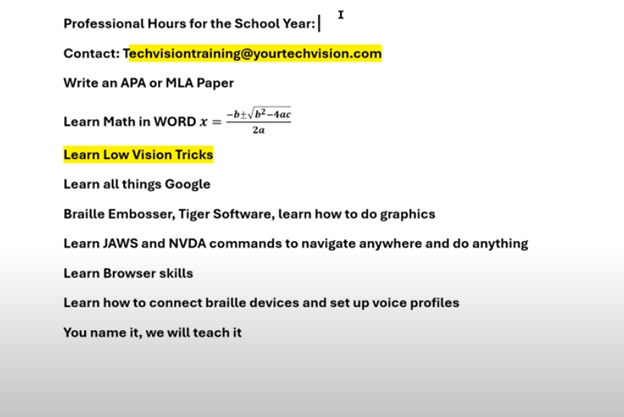
    It’s that time of year when everyone signs up for professional hours. You can join the Regular Pack, but if you need something specific for teachers of the blind, TechVision offers specialized instruction. Learn how to teach students and develop your own skills, including transcriber skills. Professional Development for Teachers often includes learning how to deal with specialized educational needs. Contact TechVision Training to learn like our students who use screen readers.

    Learn math, low vision tricks, and screen reader commands. Learn all things Google, braille embossers, and Tiger software. Master JAWS or NVDA commands, browser skills, and voice profiles. We teach everything, from box and whiskers in Excel or Google to formatting APA and MLA papers in Google Docs or Word. Learn PowerPoint or Google Slides, making them accessible and visually appealing. We offer professional development throughout the year, including one-on-one or group sessions. This ensures that during big professional development days, you are already well-prepared for exactly what you need to learn. TechVision provides another avenue to learn the skills necessary to teach your students effectively with Professional Development for Teachers. Let us know if we can help: TechVisiontraining@yourtechvision.com. In the meantime, improve the speed of your computer.

    Professional hours list and you add what you need
    Professional hours list and you add what you need

    Professional Development Opportunities for Teachers and More

    Digital Math in WORD and Braille Math Editor for Nemeth or UEB Input/Output via MathCat with JAWS or NVDA

    Teach or Learn UEB Math with JAWS and Braille Display

    UEB Math Lessons Galore with AI

    Desmos Graphing Calculator

    Creating Geometry Tables in Desmos from WORK

    Geometry in DESMOS graphing Calculator with screen reader

    STEM: Desmos with JAWS and Embossing

    Use Desmos graphing calculator to emboss graphs & insert Graphs into Math Work for teacher

    3D graphing calculator with screen reader commands in Desmos

    Desmos graphing calculator with shaded Parabolas, screen reader, braille display and embosser

    Drag and Drop with Desmos using graphing games with JAWS

    Desmos Graphing Calculator: Creating and Exporting Graphs

  • Blue Light Low Vision Tech Tricks to decrease damage to eyes and see your computer more easily

    Blue light emitted from computer screens can be harmful to your eyes over time, contributing to digital eye strain, disrupted sleep patterns, and even long-term vision damage. For those with low vision, the strain caused by blue light can make using a computer even more challenging. In this post, I will guide you through simple adjustments to your computer settings that will not only help reduce blue light exposure but also make your screen and browser easier to view, enhancing your overall comfort and visual experience with Blue Light Low Vision Tech Tricks.

    Blue light from electronic devices can cause a number of issues, including: 

    • Eye strain

    Blue light from screens can reduce contrast, leading to eye strain, dry eyes, and fatigue. 

    • Retinal damage

    Long-term exposure to blue light can damage retinal cells, which can lead to vision problems like age-related macular degeneration. 

    • Sleep disruption

    Exposure to blue light before bed can affect the body’s production of melatonin, which can disrupt sleep patterns. 

    • Other health issues

    Research suggests that exposure to blue light may contribute to cancer, diabetes, heart disease, and obesity. 

    Blue light gone for easy reading with low vision
    Blue light gone for easy reading with low vision Tech Tricks in a Browser

     Report on Blue Light Eye Damage

    To protect your eyes from blue light, you can: 

    • Limit screen time and take frequent breaks 
    • Use blue light-blocking glasses or filters on your devices 
    • Adjust your display settings 
    • Follow the 20/20/20 rule: every 20 minutes, focus on an object about 20 feet away for at least 20 seconds 
    • Get regular eye exams 

    Constant exposure to blue light over time could damage retinal cells and cause vision problems such as age-related macular degeneration. It can also contribute to cataracts, eye cancer and growths on the clear covering over the white part of the eye.

    Change the setup of your computer and save your VISION!

    Other Low Vision Lessons

    Finding mouse cursor FAST-low Vision tricks

    Proper Touch-Typing Methods-save your back

    These lessons and anything you need can be added to your School’s Professional Development Days.

  • Blind Baseball Announcer Keith Bundy Lives his Dream

    Keith Bundy, a blind baseball announcer, shared his journey of overcoming obstacles to live his dream as a sports announcer. Mr. Bundy, blind since childhood, longed to play sports but lacked opportunities in Southern Indiana. Listening to baseball broadcasts fueled his dream. In 2001, he received an invitation to announce an American Legion Baseball game. With family support and a refreshable braille display, Bundy began announcing for teams semi-professionally.

    Blind Baseball Announcer Keith Bundy Inspiring Journey

    On August 29th and 30th, significant events took place in Madison, South Dakota. The Dakota State University Trojans and the Madison Bulldogs both won their first games in their new stadiums. However, a less noticed but equally significant event occurred on August 29th. Keith Bundy, who grew up blind in Southern Indiana, fulfilled a lifelong dream by becoming an announcer in stadiums. It was a monumental day for Blind Baseball Announcer Keith Bundy.

    Growing up, Keith was passionate about sports but couldn’t participate due to his blindness. He spent many nights listening to baseball broadcasts and dreaming of being part of a team. In 2001, a chance opportunity to announce an American Legion Baseball game changed his life. With the support of his family and the use of assistive technology like a refreshable braille display, Keith began announcing baseball games. Over the years, he announced for various teams, including Dakota State University and the Madison Broncos.

    Blind baseball announcer Keith reading stats from braille display
    Blind baseball announcer Keith reading stats from braille display

    Keith is FIRST person to in new stadium

    On August 29th, Keith became the first person to announce an event in the new stadium, a moment he described as humbling and significant. He emphasized that blindness is not an insurmountable obstacle and credited his success to the right circumstances, a strong work ethic, and the support of many people, including his wife Peggy and his friend Tom Frel. Blind Baseball Announcer Keith Bundy has shown that anything is possible with the right support.

    Keith’s story is a testament to perseverance and proper education. Most of all, the power of community support in achieving one’s dreams.

    Blind individuals, with the right instruction and tools, can achieve their dreams just like anyone else. By learning essential skills, such as using assistive technology, braille, or orientation and mobility training, they can overcome obstacles that once seemed insurmountable. With guidance tailored to their needs, they gain confidence, independence, and the ability to pursue passions, whether in academics, sports, or careers. By embracing the right resources and support, blind people can turn their dreams into reality and thrive in any field they choose.

    Lessons to Help you Live YOUR Dreams

    Braille Math in Word with editor, JAWS, braille display and ease for multi-line math problems

    Graphing Inequalities, functions and shading with Desmos and screen reader

    Create Geometry Shapes from Math Work in Desmos with screen reader

    Geometry in DESMOS graphing Calculator with screen reader

    Desmos graphing calculator with shaded Parabolas, screen reader, braille display and embosser

    MLA APA format paper writing-Tech Tip

    Other Inspiring Stories

    Braille Math editor Contracted out, computer in mode with Tay–most efficient

    Jaws Braille Math editor in Word by Aubrey

    Braille Math Editor in Word with Jaws, Focus Braille Display by Campbell

    Atlanta Teen para-climber heading to Switzerland Olympics- Raveena Alli

    Microsoft Word MLA format with Christopher Duffley

  • TechVision Access Instruction-Empowering Blind and Visually Impaired

    TechVision Access Instruction is the TechVision Difference. Dr. Robinson and her Tech Vision team provide one-on-one and school team remote instruction for visually impaired individuals in real time. They enhance technology skills for students, adults, and groups by teaching them to use assistive technologies like PC computers, screen readers (JAWS, NVDA, Narrator), and Braille displays. This approach ensures students complete their work alongside peers without needing extra time

    TechVision Access Instruction aims to transform education for the blind and visually impaired. They combine the right technology with effective instruction. They offer teaching internships to advanced students, providing hands-on job skills that enhance resumes for future employment or college applications. Their goal is to empower visually impaired individuals to achieve their full potential and navigate the world confidently.

    TechVision Access Instruction
    TechVision Website

    Our Mission and Purpose is enable blind and visually impaired students the ability to access and complete work as their sighted peers. This requires, screen readers, braille displays and other access technology.

    Technology that gives you VISION with Access Instruction

    The TechVision mission and purpose, led by Dr. Robinson and her highly skilled TechVision Specialists, are to change lives via instruction in access technology, enabling inclusion and educational equality.

    The TechVision Specialists are uniquely skilled in teaching blind and low vision students. They focus on direct instruction on all technology like computers(requires Local Admin Access), screen readers, Braille displays, and smartphones. This approach has revolutionized the educational experience for blind and low vision students and clientele. Their expertise and global reach have significantly impacted students. They empower students to access information and navigate the world on an equal footing with sighted peers.

    Additionally, TechVision collaborates with school districts and private entities to address the evolving needs of education. This collaboration promotes independence and inclusion in both classrooms and the job market. By equipping students with essential skills, TechVision creates an environment of true equality. As a result, opportunities become accessible to everyone, regardless of visual impairment.

    TechVision specializes in teaching all subjects, especially advanced mathematics, to blind and visually impaired students. This enables them to succeed academically. Many of these students pursue majors in Applied Mathematics at prestigious institutions, including Harvard University. They use innovative methods to ensure blind and low vision students perform at the same high level as their sighted peers.

    Integration

    Additionally, TechVision integrates tools like Artificial Intelligence (AI), word processors, screen readers, and Braille displays to support student success. These tools allow visually impaired students to produce work comparable to their classmates. Consequently, this promotes integration and equal opportunities in academic environments: Even to the point that you can Make an Electronic Signature -Then insert it into a Document.

    Big issues occur and you can learn to resolve them via Find and restore deleted files or lost files & folders

    We offer:

    1:1 or whole Team Instruction

    Access Training

    Get to know the Team Specialists

    Expertise in Math Instruction

    What you need to do to Find a JOB

    And if you want to try your hand: Mac with VoiceOver and Key Commands

    Let us know how we can help you: Contact US: TechVisionTraining@yourtechvision.com

  • Batya Singing from Her Braille Hebrew Bible at Her Orthodox Bat Mitzvah

    The Power of a Braille Hebrew Bible and Technology

    Batya Sperling-Milner, a blind 12-year-old, spent months meticulously preparing for her Orthodox Bat Mitzvah ceremony. Unlike her peers, she faced significant challenges, for her Bat Mitzvah singing from a Braille Hebrew Bible, particularly with learning the musical notes for her Torah portion. Traditionally, visually impaired individuals memorize the notes through recordings or verbal instructions. However, this method proved especially difficult and inefficient for Batya.

    A Computer Genius

    Last year, a computer genius who is related to Batya, disturbed by the absence of lack of braille musical notes, developed a prototype overnight. for her to sing at her Bat Mitzvah using her Braille Hebrew Bible After a few days of refinement, Batya was able to use these notes on her electronic braille reader. This innovation allowed her to read each note alongside the corresponding letter, dramatically improving her ability to learn. Without this tool, Batya believes mastering her portion would have been nearly impossible.

    Batya reading Hebrew Braille Bible from Torah at  her Bat Mitzvah

    Batya Singing from the Torah at Her Bat Mitzvah Using a Braille Hebrew Bible

    Batya’s mother also played a crucial role in ensuring Batya could perform her Bat Mitzvah like any sighted person using her Braille Hebrew Bible. Overcoming challenges, including the requirement to see and read from the Torah, she presented a 33-page paper and an extensive executive summary to the leaders of their Washington DC synagogue, proving Batya’s capability. This accomplishment gave Batya immense pride, knowing she fulfilled the congregation’s obligation. She has always been a top Braille Reader.

    Batya’s accomplishment culminated in her using the Braille Hebrew Bible during her Bat Mitzvah, where she sang and read from the Torah. This experience was deeply meaningful to her. The Braille Hebrew Bible provided her with the tools she needed to fulfill the congregation’s obligation. Ultimately, this milestone brought Batya immense pride, knowing she had successfully navigated her challenges. The combination of her determination, training, her mother’s support, and the Braille Hebrew Bible allowed Batya to fully participate in her Bat Mitzvah, a ceremony that marked a significant and empowering moment in her life.

    Start Young

    4 year old began Formal instruction at 3 years old., but he began services at 5 months old. Continue with Typing to gain speed and Braille to increase reading speed

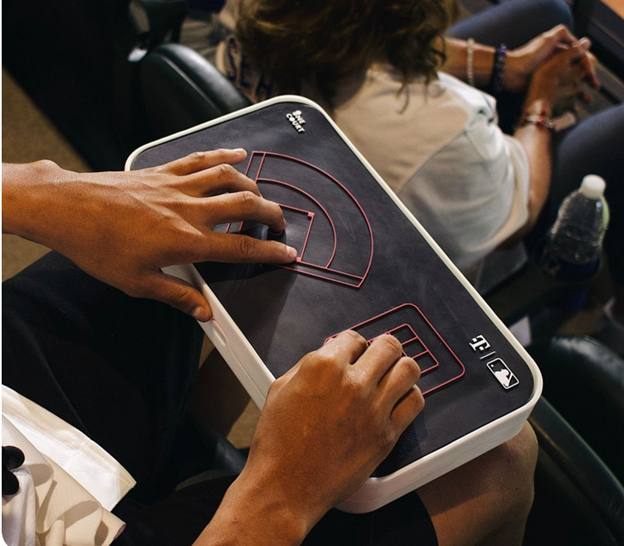
  • Sports for blind low vision people using Haptics www.onecourt.io to view live sports with your hands

    Sports for blind low vision people using Haptics www.onecourt.io to view live sports with your hands

    Jared Mace, from One Court Technologies Incorporated, works to enhance accessibility in sports for blind people. The Seattle-based startup develops innovative technology that translates live sports gameplay into vibrations. This allows visually impaired individuals to experience the game through touch. Today, Jared demonstrates this technology with Gina, a blind woman eager to participate in the action.

    The demonstration starts with Jared running a play on his laptop. Meanwhile, Gina experiences the game through vibrations at the 20-yard line. The vibrations begin on her thumb and move to her left thumb, perfectly matching the gameplay. This technology introduces a new level of accuracy and excitement to sports for blind people, enabling them to engage in the game in unprecedented ways.

    As the play progresses, Gina feels the vibrations shift to her left index finger, signaling a change in direction. The vibrations intensify, mimicking the game’s rising tension. Gina expresses her excitement, noting how this technology allows blind individuals to fully participate in sports. They can now discuss the game with friends and enjoy the experience just like sighted fans.

    Touch Down in Many Ways

    The play ends with a touchdown, marked by a strong vibration, and Gina celebrates the moment, fully immersed in the action. She then quickly wants to “see” the baseball game using another tactile overlay on the device. This device is not just about following the game; it’s about inclusion and participation. It makes sports for blind people a shared experience with their sighted peers.

    baseball overlay vibrations as game plays on TV or in a stadium

    Jared highlights that this technology revolutionizes how blind people experience sports. It breaks down barriers and creates new opportunities for engagement. The ability to feel the game in real-time through vibrations represents a significant advancement in making live sports accessible and enjoyable for everyone, especially those with visual impairments. There are online games also for people to play on computers when an actual one is NOT in play, but if you want to learn yourself, here is one young man giving basketball a try.

    Take your love of sports and being very active and going to the Olympics

  • Atlanta Teen para-climber heading to Switzerland Olympics- Raveena Alli

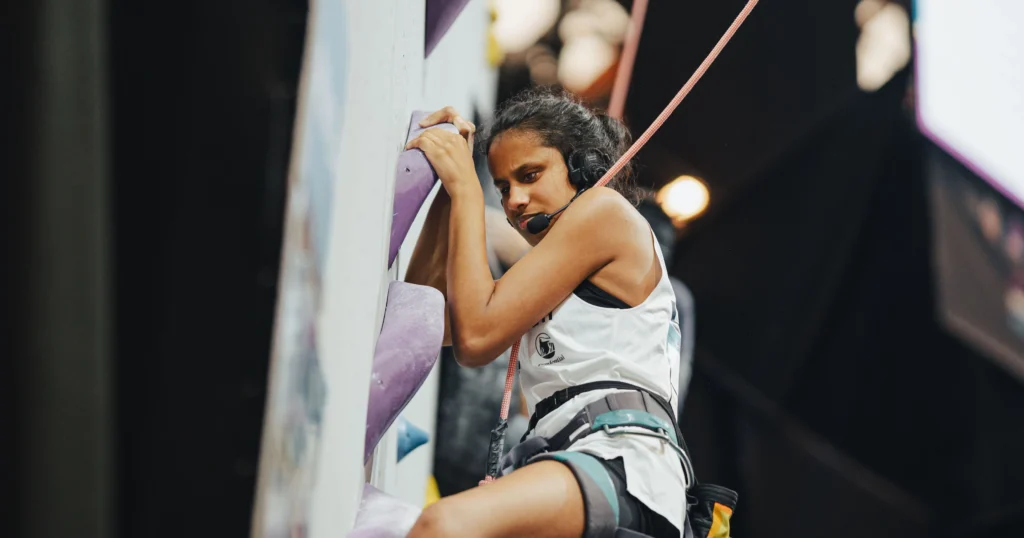
    Seventeen-year-old Olympic paraclimber Raveena Alli, a rising senior at Atlanta Girls’ School, is making waves in the world of paraclimbing. Born in India and blind since birth, Raveena has not let her visual impairment hinder her passion for climbing. She began climbing in second grade and has since become an elite para-athlete, representing Team USA. Raveena’s dedication and skill have already earned her numerous accolades, including a third-place finish at the 2022 Paraclimbing World Cup. This Olympic blind paraclimbing student is reaching new heights.

    Raveena climbing high on rock wall, speaker in her ears to listen to coach on next climb

    In the picture, Raveena Alli is seen scaling a high rock wall with determination. She wears a focused expression as she ascends, a small speaker in her ears. The speaker allows her to listen to her coach’s guidance, providing real-time feedback on her next moves. The scene captures both the physical and mental challenges she faces as a blind paraclimber, showcasing her remarkable ability to navigate the climb with her coach’s support, even without sight.

    Olympic Blind Student Para-climbing

    This year, Raveena is competing in the Para-climbing World Championships in Bern, Switzerland, a significant milestone in her climbing career. The competition, held from August 1-12, brings together top athletes from around the globe, all vying for the prestigious title. Raveena’s journey to the championships is a testament to her resilience and determination. She hopes to inspire others, particularly her blind peers, to pursue their dreams and recognize their unique abilities.

    Raveena’s ambitions extend beyond climbing; she also aspires to enter the legal field, focusing on human rights law. With a shortlist of colleges that includes Emory, UGA, and Georgetown, Raveena is preparing for a future where she can make a significant impact both in sports and in her professional life.

    Her story is not just about personal achievement but also about breaking barriers and challenging perceptions. Supported by her family, particularly her mother, who is her biggest cheerleader, Raveena continues to climb to new heights, both literally and figuratively. Her participation in the World Championships is just one step in her ongoing journey of empowerment and advocacy for people of all abilities (WSB-TV Channel 2 – Atlanta,USA Climbing).

    Story to view

    Sports board that will go anywhere you want to “see” sports

    How Colleges Help Visually Impaired Students Succeed

    Thought-Provoking Ideas on Raising Children

    Are you Color Blind–take this test

    Blind Dog Guided by Sighted Dog

    Blind Baseball Announcer Keith Bundy Lives his Dream

    Google Slides Shortcut Commands with screen reader by Campbell

  • Project Gutenberg Self-Publishing – eBooks | Read eBooks online | Free eBooks

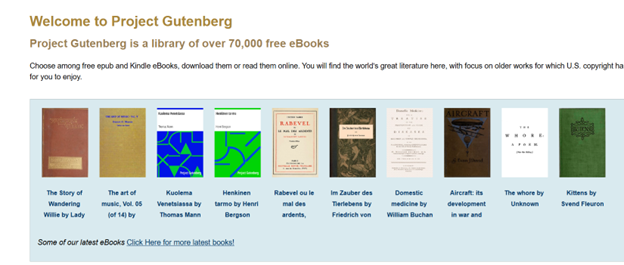
    Project Gutenberg offers Free eBooks Online Access with a vast collection of eBooks, enabling readers to access thousands of titles online for free. The platform focuses on making literature widely accessible, with a special emphasis on works that are in the public domain. Since its inception, Project Gutenberg has grown to include over 60,000 eBooks, covering a wide range of genres and subjects.

    Source: Project Gutenberg Self-Publishing – eBooks | Read eBooks online | Free eBooks

    The process of accessing eBooks on Project Gutenberg is straightforward. Users can browse the catalog by author, title, or subject. The platform also offers various formats, including plain text, HTML, and ePub, ensuring compatibility with different reading devices. Additionally, readers can choose to download eBooks or read them directly online, offering flexibility based on their preferences.

    Free eBooks Online Access & self-publishing

    One of the key features of Project Gutenberg is its self-publishing platform. Authors can publish their works independently, allowing for a diverse array of content beyond traditional publishing channels. This feature fosters a community of writers and readers, contributing to the continuous growth of the library. By offering a space for new and emerging authors, Project Gutenberg supports creative expression and the democratization of literature.

    image of project Gutenberg with images of over 70,000 free ebooks

    Project Gutenberg operates as a volunteer-driven initiative, relying on the contributions of individuals who digitize, proofread, and upload texts. This collaborative effort ensures the preservation and dissemination of literature, benefiting readers worldwide. The platform’s dedication to free access aligns with its mission to promote literacy and education globally.

    Thus, Project Gutenberg serves as a valuable online ebook resource for anyone interested in literature. Its extensive library, coupled with easy accessibility, makes it a go-to platform for readers and writers alike. By offering free eBooks and supporting self-publishing, Project Gutenberg continues to play a significant role in the literary landscape, fostering a love for reading and writing across the globe. More information on all things blind here. More information on Training

    Other Reading Options

    Search HathiTrust’s Digital Library

    Project Gutenberg Self-Publishing – eBooks | Read eBooks online | Free eBooks

    Braille Reading Speed Standards

    Download books from BARD (Braille and Audio Reading Download)

    Learn Out Loud Reading-Audio books Galore

    Learn Out Loud Reading-Audio books Galore

    For Parents: Thought-Provoking Ideas on Raising Children