Category: Braille

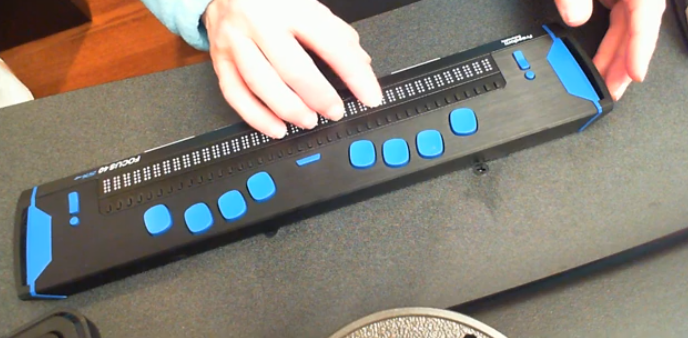
  • Cleaning the Focus 40 Braille Display and running diagnostics

    Before you begin, remember when you are using your devices to maintain upright posture to protect your spine and neck. So, regularly cleaning the Focus 40 Braille Display and running diagnostics is crucial for maintaining its performance and longevity. Dust, dirt, and oils from your hands can accumulate on the Braille cells, potentially causing malfunctions or reducing the tactile quality of the display. By keeping the Braille cells clean, you ensure that the device remains responsive and accurate. Running diagnostics helps identify any issues early, allowing for timely repairs and preventing more significant problems down the line. This proactive maintenance not only extends the life of your device but also ensures a reliable and efficient user experience12.

    Here are the steps to clean the Focus 40 Braille Display and run diagnostics:

    Cleaning the Focus 40 Braille Display

    1. Turn Off the Device: Ensure the Focus 40 Braille Display is turned off and unplugged.
    2. Prepare Cleaning Materials: Use a soft, lint-free cloth dampened with water or isopropyl alcohol. Avoid using harsh chemicals.
    3. Clean the Braille Cells: Hold the device upside down or at a downward angle. Gently wipe the raised Braille dots with the dampened cloth, ensuring all dots are cleaned. Use as much of the cloth’s surface area as necessary to avoid spreading dirt1.
    4. Dry the Device: Allow the device to air dry completely before turning it back on.
    5. Try it out and if you need training on reading as fast as you can on the display, let us know.

    Running Diagnostics

    1. Turn On the Device: Power on the Focus 40 Braille Display.
    2. Enter Diagnostic Mode: Press and hold the Menu button while turning on the device. Continue holding the button until the device enters diagnostic mode.
    3. Run Tests: Use the navigation keys to select and run various diagnostic tests, such as checking the Braille cells, buttons, and connectivity.
    4. Review Results: Follow the on-screen instructions provided by the diagnostic mode to review the results and identify any issues2.
    Cleaning the Focus 40 Braille Display and running diagnostics
    Cleaning the Focus 40 Braille Display and running diagnostics

    Regular cleaning and diagnostics help maintain the performance and longevity of your Focus 40 Braille Display, ensuring it remains responsive and reliable.

    Here is a video to demonstrate braille reading speed
  • Braille Reading Speed Standards

    So many people ask, “How fast should my child be reading?” When discussing Braille Reading Speed Standards, it’s essential to remember that blind children are just as intelligent as sighted children so standard reading speed should be used for all children. Braille Reading Fast.

    The Jerry Johns Basic Reading Inventory is a widely used tool for assessing reading speeds and comprehension levels in students. It helps educators determine a student’s instructional, independent, and frustration reading levels. This is done by evaluating their speed, accuracy, and comprehension. This inventory is particularly useful for identifying students’ reading capabilities and tailoring instruction to meet their needs. By measuring reading speeds, educators can see how students process text and find areas where they need more help to improve fluency and comprehension.

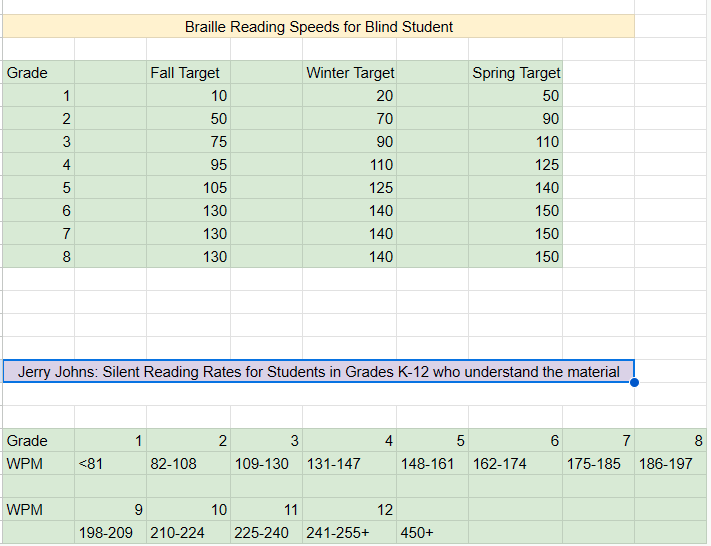
    Here are the national standards as presented by Jerry Johns, a leading reading specialist in the country. 

    Braille Reading Speeds for Blind Student 
             
    Grade Fall Target Winter Target Spring Target  
    1 10 20 50  
    2 50 70 90  
    3 75 90 110  
    4 95 110 125  
    5 105 125 140  
    6 130 140 150  
    7 130 140 150  
    8 130 140 150  


    Jerry Johns: Silent Reading Rates for Students in Grades K-12 who understand the material 
      
             
    Grade12345678
    WPM<8182-108109-130131-147148-161162-174175-185186-197
             
    WPM9101112    
     198-209210-224225-240241-255+450+   
    Braille Reading Standards Chart

    Use the SAME Braille Reading Speed Standards

    For another extensive list of information on Braille standards go to California Reading Standards

    The TechVision Team use these same standards for all blind and low vision students. To name just a couple, Batya reads both Hebrew and English Braille and Dani excels to the top of her class also. If you set high standards then children will meet those standards. We have taken on beginner students and told them how fast they would be reading braille in a couple months, even in middle and high school. Just remember the older you start the longer it will take for them to gain speed.  At the end of the 2 months, as their fingers would fly across the page reading braille, as they were timed with a fast speed, We would ask, “So did you really think you would be able to read that fast?” They would reply, “Of course, because you told me I would be able to.”

    So, tell them, they can, and they will. Our Mission and Purpose is to have students (especially with similar intelligence) at the highest levels they can be with hard work and instruction to get them there as their peers.

    Get to the Highest Levels

    Tricks to use
    Time them every week (sometime everyday), so they see their progress
    Have them reread the same material to get flow and fluency
    Have them braille the material first using contractions, then read what they wrote

    braille reading speed chart
    Visual braille reading speed chart as above accessible version

    Make sure you add in Computer skills with Perfect touch typing to truly allow students to be at the highest levels of learning.

  • Accessible UEB Braille Training Online class

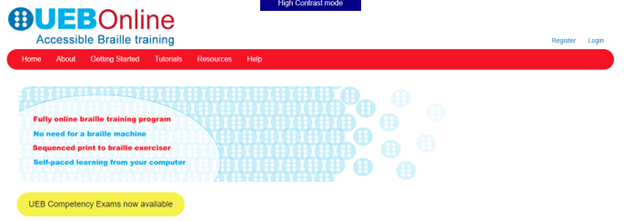
    Introducing UEB Online Training


    Welcome to UEB Online!

    Welcome to the UEB Online website, administered by the NextSense Institute. This website offers online training programs and competency exams in braille literacy and mathematics using the Unified English Braille (UEB) code.

    The purpose of the UEB Online website is to provide systematic instruction and accreditation in UEB for people worldwide who are teaching and promoting braille for persons with blindness, low vision, and deafblindness.

    Target Audience

    The UEB Online training programs and competency exams are suitable for anyone who wants to learn and teach braille. This includes educators, families, allied health professionals, and administrators and decision makers who promote the use of braille as a medium for information access and communication.

    Website Accessibility Options

    Accessible, inclusive digital technologies enable equitable information access for all through UEB Online.

    • Visual access mode: For people with sufficient sight to access regular sized print-based information on the website,
    • High contrast mode: For people with low vision who wish to adjust the font size, background colour or text color,
    • Non-Visual access mode: For people who wish to use a screen reader for accessing website information.

    UEB Online is a training program for sighted people to learn Unified English Braille (UEB). Many countries have adopted Unified English Braille, replacing standard English braille. This program is the first online UEB training tool. The program is suitable for classroom and specialist teachers, parents, teacher aides and other professionals supporting children and adults with vision impairment.

    The Royal Institute for Deaf and Blind Children’s Renwick Centre created this program.  We acknowledge the support and permission from the Round Table on Information Access for People with Print Disabilities and Australian Braille Authority for the adaptation of content from the Unified English Braille: Australian Training Manual, 2013 (edited by Howse, J., Riessen, K., & Holloway, L.).

    I am presently taking this online class. I like to get the jump on knowledge so I can teach my students along the way to keep updated with braille in general. This class is excellent, self-paced…on either a Mac or PC…learning the new (2016) UEB Braille code. I highly recommend this great and easy way to learn. When you finish, get the certification you need….and it is free!

    UEB online Accessible Braille Training
    UEB online Accessible Braille Training

    UEB Math videos and more on TechVision Youtube

  • Inclusive Multi-Sensory Learning Tools

    Sensational Books offers Inclusive Multi-Sensory Learning Tools. These tools provide a multi-sensory approach to early learning, focusing on tactile and visual experiences. Their products include books and tools designed for both sighted and visually impaired children. For example, “Sadie Can Count” is a children’s book with large print, Braille text, and fully embossed pictures. This book helps beginning readers, including those with visual impairments, to enjoy reading with their friends and family.

    Inclusive Multi-Sensory Learning- from sensational books
    Inclusive Multi-Sensory Learning- from Sensational Books

    Another notable product is the Sensational BlackBoard, which allows users to create raised-line drawings. This tool is lightweight, portable, and uses standard copy paper and a ballpoint pen. It’s designed to help users feel their drawings as they create them, making it an excellent resource for both new and experienced artists.

    Sensational Books also offers workshops and tactile artwork, promoting sensory integration and early literacy. Their products are suitable for diverse populations, including Montessori students and children with autism. The website provides a comprehensive overview of their offerings, including detailed product descriptions and testimonials from users. Some users need other types of tactile tools also.

    One example is Sensational BlackBoard which offers a fun, fast, easy and inexpensive way to get tactile access to images. Draw your own raised line pictures or you can have photo copy images of text book or research materials quickly traced. More on this site for Inclusive Multi-Sensory Learning Tools. Make sure you incorporate audio reading as a skill to add to braille reading.

    More information and lessons at: TechVision YouTube

  • Perfect Brailler for children with little fingers: Mountbatten

    Perfect Brailler for little children: Children often struggle to press the keys on a regular brailler due to their small fingers. That’s why I recommend the Mountbatten brailler.

    I’ve introduced students as young as 3 years old to the Mountbatten brailler. They can braille with perfect finger positioning using this device.

    Mountbatten- Perfect Brailler for Kids
    Mountbatten- Perfect Brailler for Kids

    We want to be careful when letting young children use the regular brailler so they don’t start poor brailling habits, such as using 2 fingers to press one key. This is not only time consuming, but also very slow because it takes so much effort to press the keys. The Mountbatten brailler, however allows for good habits to form while fingers are growing and getting stronger. Starting out correctly, our children will then be successful braillers with an ability to increase their output as they get older, creating a joy in reading what they wrote. This will lead to learning perfect touch typing on a keyboard and using a braille display on a computer. Then onto learning math on the brailler to moving it to the computer

    Perfect Brailler for Kids: Versatile and User-Friendly

    The video on the Math Window® system provides an in-depth look at how this tool benefits blind and visually impaired students. Here are some key details:

    1. Magnetic Tiles: The system uses magnetic tiles that feature both Braille and print. This dual-format approach allows students to read and interact with math problems tactilely.
    2. Portability: The Math Window® board is designed to be portable. It fits easily on a student’s desk and comes with a carrying tote, making it convenient for use in different settings.
    3. Versatility: The system is available in various versions, including basic math, algebra, and geometry. This versatility ensures that it can be used across different levels of math education.
    4. Braille Standards: Math Window® supports both Nemeth and UEB Braille standards. This compatibility ensures that it can be used by students who are familiar with either Braille system.
    5. Hands-On Learning: The tactile nature of the Math Window® system allows students to engage with math problems in a hands-on manner. This method helps in building a deeper understanding of mathematical concepts.
    6. Adaptability: Instructors can easily personalize lessons using the Math Window® system. They can arrange and modify the magnetic tiles to suit each student’s learning pace and needs.
    7. Confidence Building: By allowing students to “see” the structure of math equations through touch, the system helps build their confidence. It encourages them to explore STEM subjects more independently.
    8. Collaborative Environment: The system fosters a collaborative learning environment. Students can work individually or in groups, making it suitable for both classroom and home use.

    The Math Window® system makes an Ideal Brailler for Children with more Math lessons here

    Add keyboarding skills in also as students learn to braille and tactile math tools as learning is all encompassing

    Contact Team Specialists to help you set up a program